Welcome
Getting Started
-
Quick Start
Concepts
-
Product Concepts
-
The FHIR Standard
- FHIR Introduction
- FHIR Versions
- FHIR CRUD Operations
- FHIR Searching Basics
- FHIR Search: References and Includes
- FHIR Search: Custom Search Parameters
- FHIR Search: Combo Search Parameters
- FHIR Search: Enforcing Uniqueness
- FHIR Search: Uplifted Refchains
- FHIR Transactions and Batches
- FHIRPath Expressions
- FHIRPath Patch
-
Testing Tools
Guides
-
Installing
- Platform Requirements
- Preparing a Linux Host
- Installing Smile CDR, NGINX and PostgreSQL in a Docker Stack
- Deploying a Kubernetes Managed Cluster
- Docker Container Installation
- Configuring Smile CDR
- Unix Service Installation
- Tuning your Installation
- Designing a Cluster
- Message Brokers
- Message Broker Failure Management
- Message Broker: Kafka
- Message Broker: ActiveMQ
- Message Broker: Pulsar
- Pre-Seeding Configuration and Data
- Production Checklist
- Module Licensing
-
Upgrading
-
Planning
-
Implementation
-
Tutorials
- Introduction
- Integration Testing Tutorial
- Custom Operations Tutorial
- HL7 v2.x Ingestion Tutorial
- Federated OAuth2/OIDC Tutorial
- MDM Tutorial
- MDM UI Tutorial
- MDM First Golden Resource Tutorial
- MDM Advanced Rule Authoring Tutorial
- MDM Web UI Admin Setup Tutorial
- CDA Import Tutorial
- CDA Export Tutorial
- CDA Export - Custom Narrative Generation Tutorial
- CDA Import JSON example
- CDA Export Template JSON example
- Consent Tutorial
- CMS-0057-F IG Setup Tutorial
Reference
-
FHIR Storage
- FHIR Storage Modules
- FHIR Endpoint Module
- FHIRWeb Console
- OpenAPI / Swagger Support
- FHIR Endpoint Customization
- Resource IDs
- Search Parameters
- Search Parameter Features
- Phonetic Search Parameters
- Search Parameter Tuning
- Search Parameter Reindexing
- Searching for Data
- Creating Data
- Reading Data
- Updating Data
- Deleting Data
- Binary Data
- External Object Storage
- Externalized Resource Body Storage
- Request Tracing and Provenance
- Resource Versions and Versioned References
- Tags, Profiles, and Security Labels
- Partitioning and Multitenancy
- Patient ID Partitioning Modes
- Custom Resource Types
- Batch and Scheduled Jobs
- Tokenization
- Bulk Resource Modification
-
FHIR Storage (Relational)
- FHIR Storage (Relational) Module
- Resource Storage Mode
- Full-Text Indexing
- Performance and Caching
- Chained Searching and Sorting
- Scaling Smile CDR Databases
- MegaScale
- MegaScale Patient ID Partition Selection Modes
- Document Repository Mode
- Meta Source Migration
- Compressed Token Indexing
- Database Partition Mode
-
FHIR Storage (MongoDB)
-
Validation and Conformance
- Introduction
- Validation Support Repository
- Validation Support Repository Options
- Conformance Data
- Repository Validation
- Repository Validation: Java
- Repository Validation: Javascript
- Repository Validation: Custom Validation Beans
- Endpoint Validation
- Packages and Implementation Guides
- Package Registry Endpoint Module
- Remote Terminology Services
- Suppressing Messages
- Validation Performance
- Automatic Provenance Injection
-
Semantic Standardization
-
Interceptors
- Interceptors
- Pointcuts
- Starter Project
- Examples: FHIR Endpoints
- Examples: HL7v2 Endpoints
- Examples: FHIR Storage
- Examples: FHIR Gateway
- Examples: FHIR Client
- Examples: MDM
- Examples: Subscription
- Examples: Channel Import
- Examples: Cluster Manager
- Examples: App Sphere
- Examples: System To System Data Exchange
- 2024.02.01 Migration Guide
-
Channel Import
-
Security
- Authentication Protocols
- Authorization and Consent
- Inbound Security Module
- Local Inbound Security Module
- LDAP Inbound Security Module
- Scripted Inbound Security Module
- SAML Inbound Security Module
- Trusted Client Mode
- Roles and Permissions
- Callback Scripts
- Anonymous Access
- Consent Service
- Consent Service: JavaScript API
- Consent Service: Java API
- Security Recipes
- Two Factor Authentication
- Password Hashing Algorithms
- JWT Signature Algorithms
- Troubleshooting Security
-
Consent Module
-
SMART on FHIR
- SMART on FHIR: Introduction
- SMART: Scopes
- SMART: Auth Flows
- SMART: Endpoints
- SMART: Smile CDR Support
- SMART Outbound Security: Module
- SMART Outbound Security: Skinning
- SMART Outbound Security: Context Selection
- SMART Outbound Security: SAML Bridging
- SMART: Federated OAuth2/OIDC Login
- SMART: Application Approval/Consent
- SMART Inbound Security Module
- SMART Client Definitions
- SMART Server Definitions
- SMART OIDC Keystore Definitions
- SMART: Session Management
- SMART: Assigning Permissions
- SMART: Access Tokens
- SMART: User Profile Information
- FHIR Client Authentication
- SMART: Machine to Machine Authentication
-
FHIR Hybrid Providers
-
CDS Hooks
-
Master Data Management
- MDM
- Deduplication on Ingestion
- Integrating an External Entity Resolution Service
- Golden Record MDM
- Working with Duplicates
- MDM Rule Definition
- MDM Rule Schema Reference
- Supported Match Algorithms
- Custom MDM Matching Algorithms
- Using EIDs in MDM Rule Definition
- MDM Blocklist Definition
- MDM Survivorship Rules
- MDM Operations
- MDM API Operations Reference
- MDM Match Result Definitions
- MDM Virtualized Endpoint
- Upgrading from the EMPI module
-
IG Support
-
HL7 v2.x Support
- Introduction
- Inbound Messaging
- Inbound: Query Processing
- FHIR-Based Terminology Translation
- Outbound Messaging
- Outbound: Default Resource Conversion
- Outbound: Custom Resource Conversion
- Outbound: Verbatim Messaging
- Outbound: Transport
- Transactions
- Structure Definitions
- Segment Definitions
- Table Definitions
- Naming System Mapping
- Processing Results Feeds
- Protocol
-
CDA Exchange+ Module
-
Bulk Operations
-
Additional Features
-
Product Administration
-
JSON Admin Endpoints
- JSON Admin API
- JSON Admin Home Endpoint
- MDM Endpoint
- MDM Deprecation Migration
- Audit Log Endpoint
- Batch Job Endpoint
- Custom Scheduled Job Endpoint
- Bulk Import Endpoint
- CDA Exchange Endpoint
- Config Diagnostics Endpoint
- Metrics Endpoint
- Module Config Endpoint
- OpenID Connect Clients Endpoint
- OpenID Connect Keystores Endpoint
- OpenID Connect Servers Endpoint
- OpenID Connect Sessions Endpoint
- Privacy Notice Endpoint
- Runtime Status Endpoint
- System Config Endpoint
- Transaction Log Endpoint
- Troubleshooting Log Endpoint
- User Management Endpoint
- Version Endpoint
-
HFQL: Direct SQL Access
-
Product Configuration
-
Java Execution Environment
-
JavaScript Execution Environment
- Introduction
- Specifying JavaScript in Configuration File
- Remote Debugging
- ECMA Modules (import)
- Converter API
- Environment API
- Exceptions API
- OAuth2 Exceptions API
- FHIR REST API
- FHIR Model API
- HL7 v2.x Mapping API
- HTTP API
- LDAP API
- Log API
- Composition Resource API
- Composition Section API
- TransactionBuilder API
- Util API
- UUID API
- XML API
- Callback Models
-
Localization
-
Smile CDR CLI (smileutil)
- Introduction
- Bulk Import
- Create FHIR Package
- Execute Script Function
- Export ConceptMap to CSV
- HL7 v2.x Analyze Flat File
- HL7 v2.x Transmit Flat File
- Import CSV to ConceptMap
- Map and Upload CSV Bulk Import File
- Migrate Database
- Clear Database Migration Lock
- Module Config Properties Export
- Reindex Terminology
- Synchronize FHIR Servers
- Upgrade H2 Database File
- Upload Bundle Files
- Upload CSV Bulk Import File
- Upload Sample Dataset
- Upload Terminology
- Generate Realtime Export Schema
- Validate FHIR Resources
-
Apache Camel Integration
- Camel Module Overview
- Smile Camel Processors
- Processors: FHIR Storage module
- Processors: ETL Import module
- Processors: Camel module
- Processors: Cluster Manager module
- Processors: HL7v2 Inbound module
- Processors: CDA Exchange+ module
- Processors: Semantic Standardization module
- Processors: Transaction Logging
- Smile Camel Converters
- Smile Camel Recipes
- Smile Camel HTTP Endpoint
-
Smile Portal
-
Davinci Data Exchange
-
Modules
- JSON Admin API
- Web Admin Console
- CDA Exchange+
- Channel Import
- Cluster Manager
- Audit Log Persistence
- Audit Log OpenTelemetry
- Transaction Log Persistence
- Transaction Log OpenTelemetry
- Enterprise Master Patient Index
- CDS Hooks Endpoint
- FHIR Gateway Endpoint
- FHIR REST Endpoint (All Versions)
- FHIR REST Endpoint (DSTU2 - Deprecated)
- FHIR REST Endpoint (DSTU3 - Deprecated)
- FHIR REST Endpoint (R4 - Deprecated)
- FHIRWeb Console
- HL7 v2.x Listening Endpoint
- HL7 v2.x Listening Endpoint (Deprecated)
- HL7 v2.x Sending Endpoint
- Hybrid Providers Endpoint
- Package Registry Endpoint
- ETL Importer
- MDM
- MDM UI
- Prior Auth CRD
- Prior Auth Support
- Narrative Generator
- FHIR Storage (DSTU2 RDBMS)
- FHIR Storage (R3 RDBMS)
- FHIR Storage (R4 RDBMS)
- FHIR Storage (R5 RDBMS)
- FHIR Storage (Mongo)
- Realtime Export
- Realtime Export (Delta Lake)
- Realtime Export (Bulk Batch Replication)
- LDAP Inbound Security
- Local Inbound Security
- SAML Inbound Security
- Scripted Inbound Security
- SMART Inbound Security
- SMART Outbound Security
- Subscription Matcher (All FHIR Versions)
- Subscription Matcher (DSTU2 - Deprecated)
- Subscription Matcher (DSTU3 - Deprecated)
- Subscription Matcher (R4 - Deprecated)
- appSphere
- Payer to Payer (Deprecated)
- System to System Data Exchange
- License
- Camel
- Smile Camel HTTP Endpoint
- Consent Module
- Smile Portal
- Davinci Data Exchange
-
Custom Scheduled Jobs
-
Appendix
Generated Reference
-
Configuration Categories
- Web Admin Console Settings
- appSphere
- Payer Config
- Initial appSphere Seeding
- Authentication Callback Scripts
- Auth: General for APIs
- User Authentication
- Auth: HTTP Basic
- Auth: OpenID Connect
- Browser Syntax Highlighting
- Bulk Batch Replication
- Camel HTTP Endpoint
- Camel
- Capability Statement (metadata)
- CDA Export
- CDA Import
- CDA Interceptors
- CDA JavaScript Execution Scripts
- CDA Terminology
- CDS Hooks Definitions
- CDS Hooks On FHIR
- Channel Import
- Channel Retry
- Cluster Manager Interceptors
- Kafka
- Cluster Manager Maintenance
- Message Broker
- Pulsar
- Cluster Level Security
- Consent
- Credentials
- Cross-Origin Resource Sharing (CORS)
- Invoke Export
- Member Match
- Database
- Da Vinci Health Record Exchange
- Delta Lake Export
- EasyShare SMART Health Links
- Email Configuration
- MDM UI
- ETL Import: CSV Properties
- ETL Import: Source
- External Object Storage
- FHIR Binary Storage
- FHIR Bulk Modification Operations
- FHIR Bulk Import/Export Operations
- Capability Statement
- FHIR Configuration
- Consent Service
- FHIR Endpoint Conversion
- FHIR Endpoint HFQL Support
- FHIR Endpoint Partitioning
- Resource Providers
- FHIR Endpoint Security
- Endpoint Terminology
- FHIR Gateway Cache
- FHIR Gateway Configuration
- FHIR Interceptors
- LiveBundle Service
- FHIR MDM Server
- FHIR Performance
- FHIR Performance Tracing
- FHIR Realtime Export
- Repository Validation
- FHIR Resource Body Storage
- FHIR Resource Types
- FHIR REST Endpoint
- FHIR Search
- Custom Resource Types
- IG Support
- MegaScale
- FHIR Storage Module Conditional Updates
- FHIR Storage Module Scheduled Tasks
- FHIR Validation Services
- FHIR Validation Services Remote Terminology Client TLS / SSL (Encryption)
- FHIR Storage Package Registry
- FHIR Storage Partitioning
- Versioned References
- FHIR Subscription Delivery
- FHIR Subscription Persistence
- FHIR Tokenization
- Full-Text Indexing
- HL7 v2.x Resource Deduplication
- HL7 v2.x Mapper - Contained Resource
- HL7 v2.x Mapper - DG1
- HL7 v2.x Mapper - Forced Namespace Mode
- HL7 v2.x Mapper - General
- HL7 v2.x Mapper - Medications
- HL7 v2.x Mapper - OBR
- HL7 v2.x to FHIR Mapper - OBSERVATION Group
- HL7 v2.x Mapper - ORC
- HL7 v2.x to FHIR Mapper - ORDER_OBSERVATION Group
- HL7 v2.x Mapper - PID
- HL7 v2.x Mapper - PV1
- HL7 v2.x Mapper - TXA
- Listener Interceptors
- HL7 v2.x Listener Script
- HL7 v2.x Listening Endpoint
- HL7 v2.x MLLP Listener
- HL7 v2.x MLLP Sender
- FHIR to HL7 v2.x Mapper Script
- HL7 v2.x Outbound Mapping
- HTTP Access Log
- HTTP Listener
- HTTP Request Pool
- HTTP Security
- Hybrid Providers Definitions
- IG Support
- Initial Custom Roles Seeding
- Initial User Seeding
- JavaScript Execution Environment
- JSON Web KeySet (JWKS)
- LDAP Authentication
- Smile CDR License
- MDM
- Migration
- Narrative Generator
- OpenID Connect Token Validation
- OpenID Connect (OIDC)
- Prior Authorization Coverage Requirement Discovery
- Prior Authorization Support
- Privacy Security Notice
- Provenance Injection
- Realtime Export
- Endpoint Validation: Request Validating
- Search Parameter Seeding
- SAML Provider
- Security Inbound Script
- Inbound SMART on FHIR Authentication
- Inbound SMART on FHIR Endpoints
- OAuth2/OIDC Federation
- SMART Callback Script
- Cross-Organizational Data Access Profile
- SMART Login Skin
- SMART Login Terms of Service
- SMART Authorization
- SMART Definitions Seeding
- Semantic Standardization Configuration
- Sessions
- Smile Portal
- Terminology Suggestions
- Two Factor Authentication
- TLS / SSL (Encryption)
- Transaction Log
- Trusted Client
- User Self Registration
-
Module Dependencies
-
Product Reference
Payer To Payer
-
Reference
Prior Authorization Solution
-
How-to Guides
-
Tutorials
Provider Access API
Patient Access API
-
Reference
-
Tutorials
-
Tags
- Pages tagged with "activemq"
- Pages tagged with "admin-json"
- Pages tagged with "admin-ui"
- Pages tagged with "administration"
- Pages tagged with "advanced"
- Pages tagged with "api"
- Pages tagged with "app-gallery"
- Pages tagged with "architecture"
- Pages tagged with "audit"
- Pages tagged with "authentication"
- Pages tagged with "authorization"
- Pages tagged with "automation"
- Pages tagged with "aws"
- Pages tagged with "azure"
- Pages tagged with "batch"
- Pages tagged with "batch-operations"
- Pages tagged with "batch-processing"
- Pages tagged with "beginner"
- Pages tagged with "best-practices"
- Pages tagged with "bulk-operations"
- Pages tagged with "caching"
- Pages tagged with "camel"
- Pages tagged with "cda"
- Pages tagged with "cda-exchange-plus"
- Pages tagged with "cds-hooks"
- Pages tagged with "certification"
- Pages tagged with "changelog"
- Pages tagged with "channel-import"
- Pages tagged with "clinical-reasoning"
- Pages tagged with "cloud"
- Pages tagged with "cluster"
- Pages tagged with "codesystem"
- Pages tagged with "compliance"
- Pages tagged with "composition"
- Pages tagged with "concept"
- Pages tagged with "conceptmap"
- Pages tagged with "configuration"
- Pages tagged with "conformance"
- Pages tagged with "consent"
- Pages tagged with "conversion"
- Pages tagged with "csv"
- Pages tagged with "customization"
- Pages tagged with "cve"
- Pages tagged with "da-vinci"
- Pages tagged with "data-stewardship"
- Pages tagged with "database"
- Pages tagged with "davinci"
- Pages tagged with "debugging"
- Pages tagged with "delta-lake"
- Pages tagged with "dependencies"
- Pages tagged with "deployment"
- Pages tagged with "deprecated"
- Pages tagged with "developer"
- Pages tagged with "diagnostics"
- Pages tagged with "docker"
- Pages tagged with "document-generation"
- Pages tagged with "documentation"
- Pages tagged with "easyshare"
- Pages tagged with "elasticsearch"
- Pages tagged with "empi"
- Pages tagged with "error-handling"
- Pages tagged with "etl"
- Pages tagged with "etl-import"
- Pages tagged with "experimental"
- Pages tagged with "export"
- Pages tagged with "feature-maturity"
- Pages tagged with "features"
- Pages tagged with "fhir"
- Pages tagged with "fhir-client"
- Pages tagged with "fhir-endpoint"
- Pages tagged with "fhir-gateway"
- Pages tagged with "fhir-repository"
- Pages tagged with "fhir-storage"
- Pages tagged with "fhirpath"
- Pages tagged with "getting-started"
- Pages tagged with "grafana"
- Pages tagged with "guide"
- Pages tagged with "health-checks"
- Pages tagged with "hl7v2"
- Pages tagged with "how-to"
- Pages tagged with "howto"
- Pages tagged with "http"
- Pages tagged with "hybrid-providers"
- Pages tagged with "indexing"
- Pages tagged with "ingestion"
- Pages tagged with "integration"
- Pages tagged with "interceptor"
- Pages tagged with "interceptors"
- Pages tagged with "intermediate"
- Pages tagged with "internationalization"
- Pages tagged with "interoperability"
- Pages tagged with "java"
- Pages tagged with "javascript"
- Pages tagged with "jdbc"
- Pages tagged with "junit"
- Pages tagged with "jvm"
- Pages tagged with "jwt"
- Pages tagged with "kafka"
- Pages tagged with "kubernetes"
- Pages tagged with "ldap"
- Pages tagged with "libraries"
- Pages tagged with "licensing"
- Pages tagged with "linux"
- Pages tagged with "logging"
- Pages tagged with "logs"
- Pages tagged with "loinc"
- Pages tagged with "mappings"
- Pages tagged with "mariadb"
- Pages tagged with "mdm"
- Pages tagged with "member-match"
- Pages tagged with "message-broker"
- Pages tagged with "messaging"
- Pages tagged with "metrics"
- Pages tagged with "migration"
- Pages tagged with "module-management"
- Pages tagged with "mongodb"
- Pages tagged with "monitoring"
- Pages tagged with "mssql"
- Pages tagged with "narrative"
- Pages tagged with "navigation"
- Pages tagged with "ndjson"
- Pages tagged with "nginx"
- Pages tagged with "oauth2"
- Pages tagged with "observability"
- Pages tagged with "openid"
- Pages tagged with "opentelemetry"
- Pages tagged with "operations"
- Pages tagged with "oracle"
- Pages tagged with "otel"
- Pages tagged with "overview"
- Pages tagged with "package-install"
- Pages tagged with "packages"
- Pages tagged with "partitioning"
- Pages tagged with "patient"
- Pages tagged with "patient-matching"
- Pages tagged with "payer-to-payer"
- Pages tagged with "performance"
- Pages tagged with "permissions"
- Pages tagged with "postgresql"
- Pages tagged with "premium"
- Pages tagged with "privacy"
- Pages tagged with "processors"
- Pages tagged with "product-administration"
- Pages tagged with "product-lifecycle"
- Pages tagged with "product-planning"
- Pages tagged with "production"
- Pages tagged with "prometheus"
- Pages tagged with "provenance"
- Pages tagged with "pulsar"
- Pages tagged with "redis"
- Pages tagged with "reference"
- Pages tagged with "releases"
- Pages tagged with "remote-services"
- Pages tagged with "repository"
- Pages tagged with "rest-api"
- Pages tagged with "roadmap"
- Pages tagged with "rte"
- Pages tagged with "rule-authoring"
- Pages tagged with "saml"
- Pages tagged with "scaling"
- Pages tagged with "scheduled-jobs"
- Pages tagged with "scripting"
- Pages tagged with "search"
- Pages tagged with "security"
- Pages tagged with "semantic-standardization"
- Pages tagged with "session-management"
- Pages tagged with "setup"
- Pages tagged with "smart"
- Pages tagged with "snomed"
- Pages tagged with "spring-batch"
- Pages tagged with "sql"
- Pages tagged with "storage"
- Pages tagged with "structuredefinition"
- Pages tagged with "subscription"
- Pages tagged with "swagger"
- Pages tagged with "system-to-system-data-exchange"
- Pages tagged with "systemd"
- Pages tagged with "templates"
- Pages tagged with "terminology"
- Pages tagged with "testcontainers"
- Pages tagged with "testing"
- Pages tagged with "tls"
- Pages tagged with "transaction-logging"
- Pages tagged with "transactions"
- Pages tagged with "transformation"
- Pages tagged with "translation"
- Pages tagged with "troubleshooting"
- Pages tagged with "tutorial"
- Pages tagged with "upgrading"
- Pages tagged with "user-management"
- Pages tagged with "validation"
- Pages tagged with "valueset"
- Pages tagged with "version-info"
- Pages tagged with "versioning"
- Pages tagged with "vulnerabilities"
- Pages tagged with "web-ui"
- Pages tagged with "xml"
Realtime Export OverviewLMA
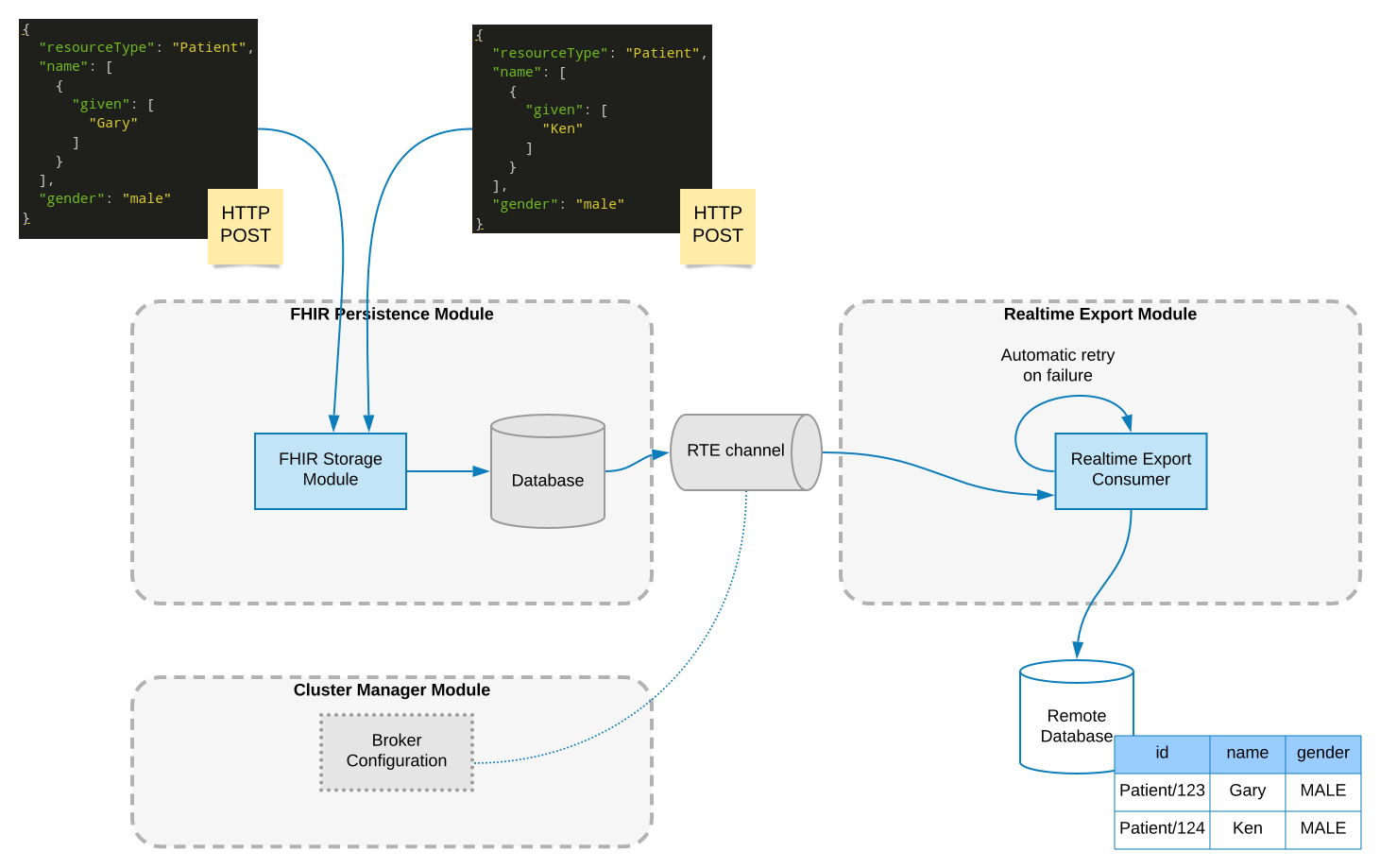
The purpose of the Realtime Export module is to permit realtime extraction of FHIR data from Smile CDR into a remote database. The following diagram shows a quick overview of the architecture of the realtime export process.
For targets that prefer few large writes over per-change streaming, Bulk Batch Replication is a scheduled batch sibling of this module: it periodically replicates windows of resource version history in bulk to a pluggable IRepository target.
Before discussing configuration of the module, it is important to note that there are two main modes in which Realtime Export can operate. These two modes are POINTCUT and CHANNEL.
Pointcut Mode
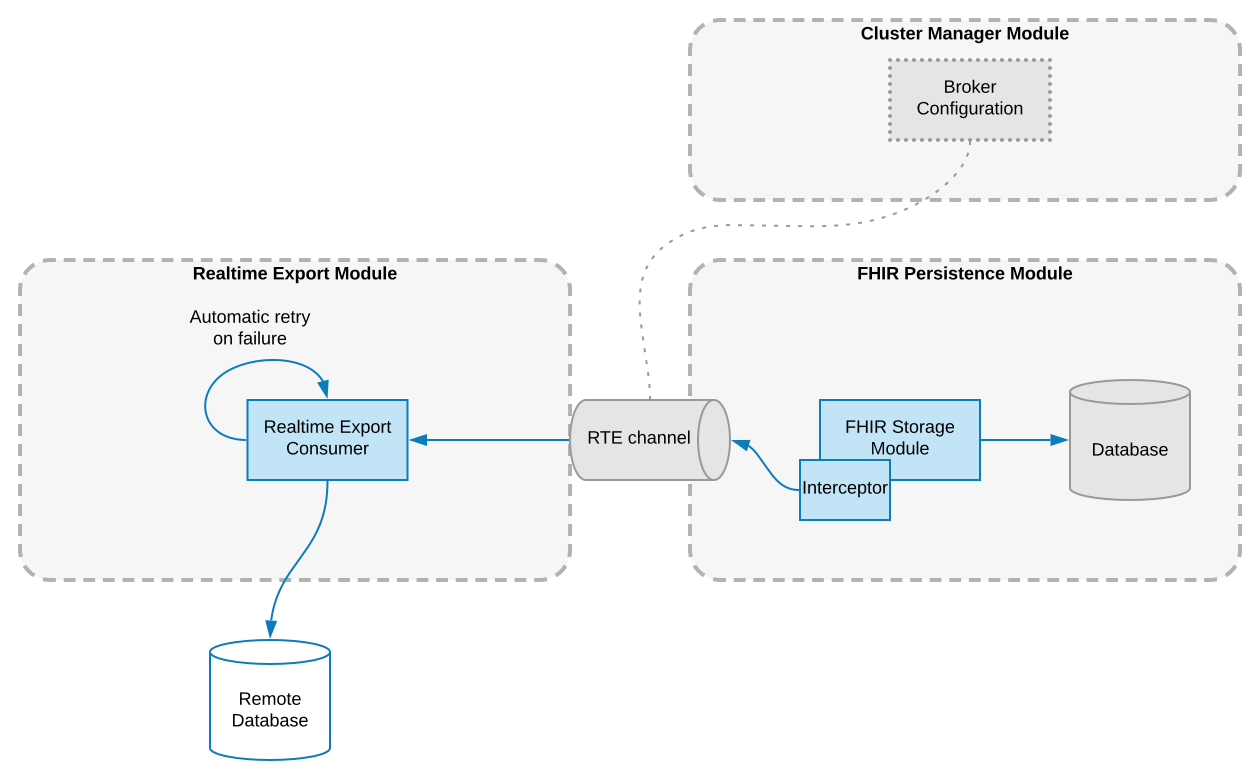
In POINTCUT mode, the Smile CDR Storage module has an interceptor registered on it which forwards all Creates/Updates/Deletes to an internal channel, which Realtime Export consumes. The advantage of this mode is that it requires no external software, and works out of the box. To accomplish this,
Realtime Export relies on a Storage module as a dependency.
Channel Mode
As of 2024.11.R01, support for Debezium has been removed. This means this setting is no longer read, and POINTCUT mode is always used.
FHIR Storage Module (Pointcut)
The FHIR Storage is the source of the data used by Realtime Export. If the source type is set to POINTCUT, then this dependency must be filled. If you are instead using CHANNEL, then Realtime Export module does not require a Storage module dependency. Note that if you do depend on the Storage module, you must enable the Pointcut-based Realtime Export mode so that the module correctly registers all necessary interceptors.
Cluster Manager Module
The Cluster Manager module contains the configuration used to connect to the selected message broker.
See the Message Brokers documentation for information on how to select and configure a message broker. By default an embedded Apache ActiveMQ server will be used, and this is acceptable for testing purposes but an external broker should be used in a production scenario.
Operational OverviewLMA
At a high level, Realtime Export listens for all changes to FHIR resources. This includes creates, updates, and deletes. Upon detecting such a change,
the Realtime Export module will apply any relevant transformations to the resource, in order to convert it into a form that can be easily consumed by an RDBMS. After this,
it will generate and execute the SQL commands necessary to update the remote database. This transformation is done via user-configured transformers.
LimitationsLMA
Currently there are several limitations of Realtime Export.
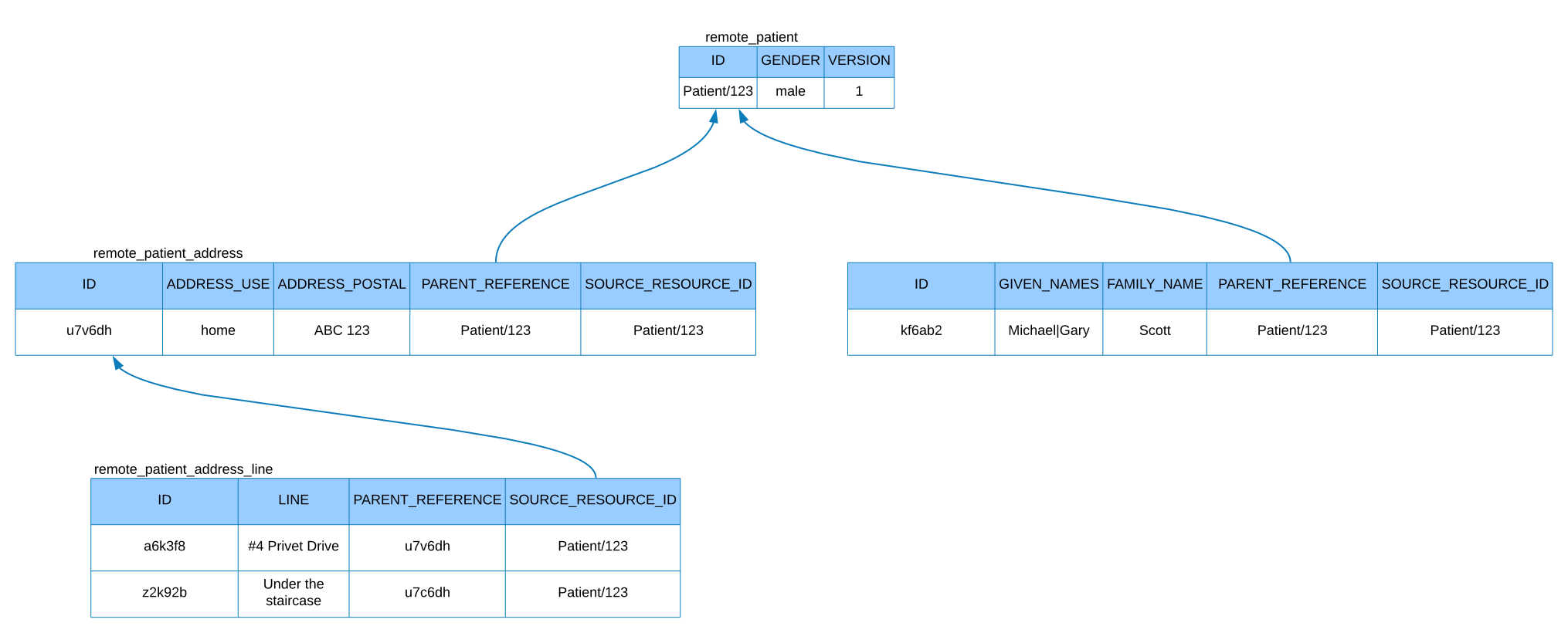
Firstly, the remote database schema must already exist. This means that in order to effectively use realtime export, it will be necessary to spend some time creating the schema manually. During schema creation, there are several needs that must be addressed.
- Each top-level table must have an integer field called
version. This is needed to handle logical updates of remote data. - Each child table must have a string field called
id. This will be automatically filled with a UUID. - Each child table must have a string field called
parent_reference, which is constrained by the ID of the parent table it refers to. - Each child table must have a string field called
source_resource_id.This is needed to handle logical deletes. - While Realtime Export will generate and execute the SQL required to add data to the remote database, creation of foreign key constraints must be handled by the user.
Next, it is important to note that each remote table is designed to hold exactly one resource type. This means that in its current implementation, remote tables cannot be partially filled by multiple resources. In general, one resource corresponds to one completed row in one or more remote tables.
Here is an example of an appropriate schema for realtime export. Note that in future examples, some columns may be omitted for brevity.
TroubleshootingLMA
The Realtime Export Troubleshooting log can be helpful in diagnosing issues relating to Realtime Export. Furthermore, if a message completely fails processing, the cause of the failure is stored along with the failed message.
Supported DatabasesLMA
Realtime Export supports exporting data to the following database systems:
| Database | Driver Type | Notes |
|---|---|---|
| PostgreSQL | POSTGRES_9_4 | Recommended for production use |
| MariaDB | MARIADB_10_1 | Production ready |
| Oracle | ORACLE_12C | Production ready |
| Microsoft SQL Server | MSSQL_2012 | Production ready |
| H2 | H2_EMBEDDED | For testing only |
| Derby | DERBY_EMBEDDED | For testing only |
| Snowflake | SNOWFLAKE | Experimental, supports Hybrid Tables |
Snowflake Support
Snowflake is supported as a target database for Realtime Export, including support for Snowflake Hybrid Tables which provide:
- ACID Transactions: Full transactional guarantees with commit/rollback support
- Primary Key Enforcement: Hybrid tables enforce primary key constraints
- Foreign Key Integrity: Referential integrity between parent and child tables
- Row-level Locking: Concurrent updates with row-level locking
Authentication Methods
Snowflake supports three authentication methods with the following precedence:
- Programmatic Access Token (PAT) - Recommended for MFA-enabled accounts. If set, takes precedence over all other methods.
- OAuth Token - For OAuth-based authentication. Used when PAT is not provided.
- Password - Standard username/password authentication. Used as fallback.
Configuration Examples
Using Password Authentication:
module.realtime_export.config.db.driver=SNOWFLAKE
module.realtime_export.config.db.url=jdbc:snowflake://<snowflake-account>.snowflakecomputing.com?db=<snowflake-db-name>&schema=<snowflake-schema>&warehouse=<snowflake-warehouse>&role=<snowflake-role>&JDBC_QUERY_RESULT_FORMAT=JSON
module.realtime_export.config.db.username=myuser
module.realtime_export.config.db.password=mypassword
Using PAT Authentication (recommended for MFA-enabled accounts):
module.realtime_export.config.db.driver=SNOWFLAKE
module.realtime_export.config.db.url=jdbc:snowflake://<snowflake-account>.snowflakecomputing.com?db=<snowflake-db-name>&schema=<snowflake-schema>&warehouse=<snowflake-warehouse>&role=<snowflake-role>&JDBC_QUERY_RESULT_FORMAT=JSON
module.realtime_export.config.db.username=myuser
module.realtime_export.config.rte.snowflake.pat=<your-programmatic-access-token>
Using OAuth Token Authentication:
module.realtime_export.config.db.driver=SNOWFLAKE
module.realtime_export.config.db.url=jdbc:snowflake://<snowflake-account>.snowflakecomputing.com?db=<snowflake-db-name>&schema=<snowflake-schema>&warehouse=<snowflake-warehouse>&role=<snowflake-role>&JDBC_QUERY_RESULT_FORMAT=JSON
module.realtime_export.config.db.username=myuser
module.realtime_export.config.rte.snowflake.token=<your-oauth-token>
When using Snowflake Hybrid Tables, ensure your schema uses CREATE HYBRID TABLE statements and includes appropriate PRIMARY KEY and FOREIGN KEY constraints.
Batch ProcessingLMA
For improved performance, especially with databases like Snowflake, Realtime Export supports batch processing of multiple resources within a single transaction. Batch operations:
- Group resources by target table for efficient batch inserts
- Preserve insertion order to satisfy foreign key constraints (parent resources like Patient are inserted before child resources)
- Use JDBC batch operations for improved throughput
- Process all resources in a single transaction for atomicity
Batch processing is automatically used when multiple resources are created together (e.g., when processing a Bundle).
Loading Existing Data
If using Realtime Export, it is best to start with empty databases on both sides (both FHIR and remote repositories).
However, if a FHIR database already exists, Smile provides a way to load existing FHIR resources into the remote repository.
For details and limitations, see loading existing Data