Deploying a Kubernetes Managed Cluster
This page describes how Smile CDR's modular design can be deployed and managed as part of a Kubernetes cluster. Note that this page focuses primarily on clustering the Smile CDR application itself. Clustering or hosting of other components such as the database, message broker, and reverse proxy are not addressed here.
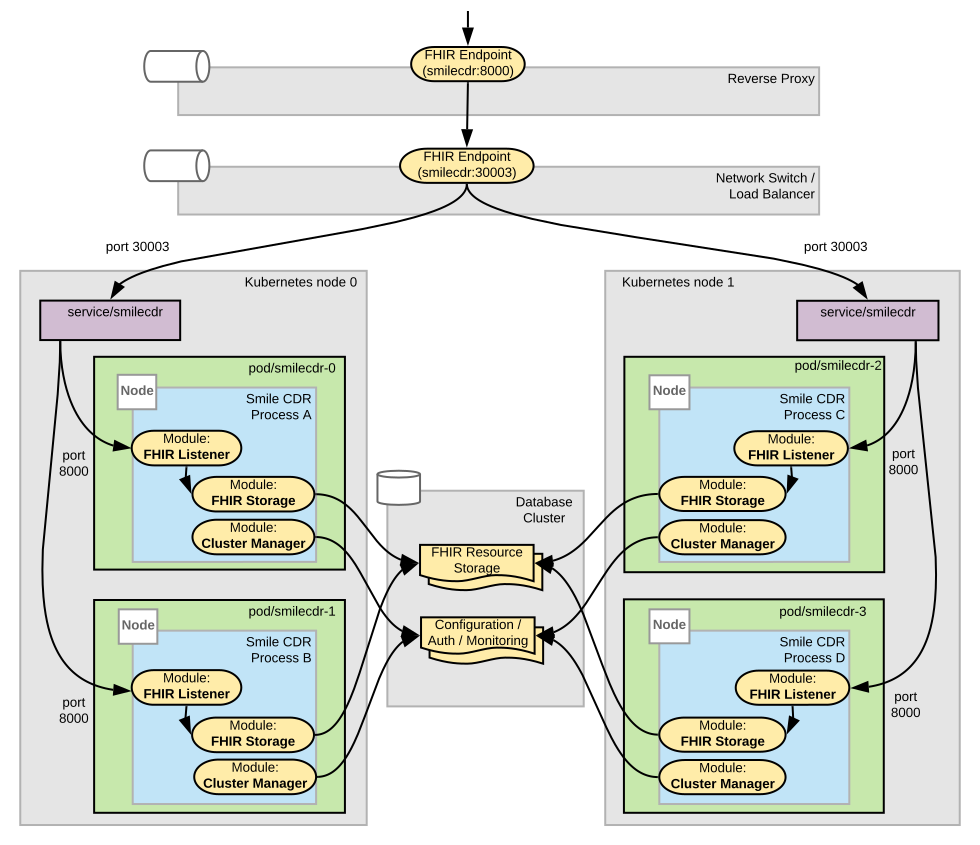
The deployment steps below highlight two different options:
- Option 1 – A single process node example. The entire Smile CDR application is replicated across the cluster.
- Option 2 – A multiple process node example. Separate process definitions are created for each of the following, allowing them to be separately replicated:
- FHIR REST Endpoint and FHIR Storage modules
- SMART on FHIR modules
- Subscription and FHIR Storage modules
- Administration modules (Web Admin Console and JSON Admin API)
While most of what follows is applicable to both options, there are sections that differ between the options. Take note of which option you would like to deploy and follow along accordingly.
Overview of Smile CDR Kubernetes Deployment Process
The basic steps to creating a Smile CDR Kubernetes Cluster are as follows:
-
Pre-requisite steps:
- Obtain a copy of the Smile CDR Docker image.
- Provision servers/environments for hosting Smile CDR cluster, database, message broker, and load balancer (as needed).
- Install Docker container and Kubernetes runtime packages.
- Deploy external dependencies, including: database, message broker, reverse proxy, and load balancer.
-
Prepare Kubernetes configuration files.
-
Deploy Smile CDR in Kubernetes cluster.
-
Configure reverse proxy to enable Smile CDR services to be accessed through the configured ports.
-
Configure load balancer if multiple Kubernetes nodes are being used.
The sections that follow will provide more details about these steps.
Pre-requisite Steps
Obtain a Copy of the Kubernetes-Enabled Smile CDR Docker Image
A Smile CDR Docker image is available that can be used either in standalone Docker deployments or in Kubernetes deployments. See the Docker Container Installation page for more information.
Provision Servers/Environments
Ensure that the servers or environments hosting the Smile CDR processes are able to communicate with each other as well as to the servers hosting the database and message broker. Additionally, ensure that any servers hosting the reverse proxy and load balancer are able to communicate with the Kubernetes node components.
Install Docker Container and Kubernetes Runtime Packages
The steps for installing Kubernetes will vary depending on the type of environment or cloud provider being used to host the Kubernetes components.
- Instructions for deploying Docker container runtime packages can be found here.
- Instructions for deploying and configuring Kubernetes runtime packages can be found here.
Deploy External Dependencies
The database, message broker, reverse proxy, and load balancer do not need to be managed by Kubernetes to work with a clustered Smile CDR. As such these components can be deployed separately.
Regardless of how the external components are deployed, note the IP addresses, hostnames, and port numbers needed to connect to the database and message broker. This information will be needed later when configuring Smile CDR.
Configuring Kubernetes
A number of Kubernetes objects need to be configured in order for Kubernetes to manage a Smile CDR cluster, and to ensure that external systems are able to interact with the Smile CDR cluster. These include the following:
- Services – Enable Smile CDR API and ports to be visible outside of the cluster.
- ConfigMaps – *(optional) Define configuration that will overwrite the default
cdr-config-Master.propertiesfile and supply acustomerlib/logback-smile-custom.xmlfile for logging customizations at startup time. - Deployments – Define how Smile CDR instances will be deployed as Kubernetes pods.
The following sections provide more detailed explanations and examples for each type of Kubernetes object.
Kubernetes and Smile CDR Database Connections
One of the features of Kubernetes is that it can automatically add and remove instances of an application in a cluster. When removing an instance of an application, Kubernetes will first send a shutdown request to the application, and if the application is not stopped after a specified period of time (typically 30 seconds by default), will then forcefully terminate the application.
Normally, 30 seconds is more than enough time for Smile CDR to shut down gracefully. However, in some cases e.g. a request or scheduled task is waiting on a long-running query to finish, Smile CDR may require more than 30 seconds to complete its shutdown. If Smile CDR is forcefully terminated in these cases, this can potentially lead to problems of database connections not being closed properly.
To avoid potential problems with improperly closed database connections, it is recommended that Kubernetes pods be configured with terminationGracePeriodSeconds value set to at least 30 seconds plus the maximum Default Query Timeout value for any Cluster Manager or Persistence modules configured in the pod. See database configuration documentation for more information about the Default Query Timeout configuration setting. See the Deployment Definitions section for Kubernetes configuration samples with the terminationGracePeriodSeconds setting configured.
Kubernetes Health Probes
Every Smile CDR process can serve three endpoints for Kubernetes probes on a dedicated status port: /startup (has it finished starting?), /readiness (can it serve traffic?) and /liveness
(does it need a restart?). Each returns HTTP 200 when healthy and 503 otherwise, and answers from early in startup, before any module has started.
The endpoints are off by default. Turn them on in the node configuration properties file mounted into the pod, alongside node.id:
node.status.port=9300
Process Status Endpoints describes the responses and each health check. The probes:
startupProbe:
  httpGet:
    path: /startup
    port: 9300
  periodSeconds: 5
  failureThreshold: 60   # allows up to ~5 min to start; raise for slower deployments
readinessProbe:
  httpGet:
    path: /readiness
    port: 9300
  periodSeconds: 10
  timeoutSeconds: 6      # must exceed node.status.health_check_timeout_seconds (default 5)
  failureThreshold: 3
livenessProbe:
  httpGet:
    path: /liveness
    port: 9300
  periodSeconds: 10
  timeoutSeconds: 6      # must exceed node.status.health_check_timeout_seconds (default 5)
  failureThreshold: 6    # longer than readiness, so traffic stops before the pod restarts
- Startup time.
startupProbe.failureThreshold×periodSecondsis how long the pod has to start before Kubernetes restarts it; size it to your slowest start. Readiness and liveness are not checked until startup succeeds. timeoutSeconds. Set it abovenode.status.health_check_timeout_seconds(default5) on bothreadinessProbeandlivenessProbe. The Kubernetes default of 1 second gives up before the health checks finish and counts even a passing check as a failure. If you raisenode.status.health_check_timeout_seconds, raise both probes to match.- What restarts the pod. A failing liveness check (in a standard installation, only
memory_pressure; see What/livenessreports), or a process too unresponsive to answer/livenesswithintimeoutSeconds. Checks that are merely slow do not. - Never point
livenessProbeat/readiness. Readiness includes dependencies such as the database, and restarting every pod does not fix a slow database. - Shutdown.
/readinessreportsNOT_READYas soon as shutdown begins, so Kubernetes stops sending traffic to the pod for the wholeterminationGracePeriodSeconds. - Changing the port. Set a different
node.status.port, and updatecontainerPortand every probe to match.node.server_port_offsetis added to it, as to every server port on the node.
The endpoints need no login, so restrict the status port with a NetworkPolicy or security group so that only Kubernetes can reach it, and keep it out of your Services; see Service Definitions.
JVM Memory Settings
The memory_pressure check catches a process that is running short of memory, not one that has run out. For that case, add -XX:+ExitOnOutOfMemoryError, so that the process stops and Kubernetes restarts it, instead of it running on in a broken state with database connections held open.
Set JVM options in the JVMARGS environment variable, as the Deployment examples below do. JVMARGS
replaces all of the setenv script's defaults, including its fixed -Xmx4g heap, so include every option you need. The examples use -XX:MaxRAMPercentage so that the heap follows
resources.limits.memory.
Service Definitions
Each Smile CDR process that implements externally visible ports requires a Kubernetes service configured with spec of type NodePort so that the ports are accessible outside of the cluster.
A couple of things to note about the service definitions:
- Kubernetes restricts the port numbers that can be exposed outside of the cluster to the range 30000-32767. As such, in the service definitions it will be necessary to map the configured Smile CDR port numbers to external port numbers allowed within this range.
- The
.selectorelement value must match the.spec.template.metadata.labelselement value in the Deployment definition. - The status port used by the health probes (9300 in the examples below) is deliberately not included in any of the service definitions below. Those endpoints are unauthenticated and are only meant to be reached by the kubelet from inside the cluster. Exposing them through a NodePort service would make them reachable from outside it.
Option 1 – Where a single process configuration is used, the Kubernetes Service definition should look something like the following:
apiVersion: v1
kind: Service
metadata:
  name: smilecdr
spec:
  type: NodePort
  ports:
  - name: "80"
    port: 80
    nodePort: 30001
    targetPort: 80
  - name: "443"
    port: 443
    nodePort: 30002
    targetPort: 443
  - name: "8000"
    port: 8000
    nodePort: 30003
    targetPort: 8000
  - name: "9000"
    port: 9000
    nodePort: 30004
    targetPort: 9000
  - name: "9100"
    port: 9100
    nodePort: 30005
    targetPort: 9100
  - name: "8001"
    port: 8001
    nodePort: 30006
    targetPort: 8001
  - name: "9200"
    port: 9200
    nodePort: 30007
    targetPort: 9200
  - name: "9201"
    port: 9201
    nodePort: 30008
    targetPort: 9201
  selector:
    app: smilecdr
Option 2 – Where multiple process configurations are used, the Kubernetes Service definitions should look something like the following:
apiVersion: v1
kind: Service
metadata:
  name: smilecdr-mgmt
spec:
  type: NodePort
  ports:
  - name: "80"
    port: 80
    nodePort: 30001
    targetPort: 80
  - name: "443"
    port: 443
    nodePort: 30002
    targetPort: 443
  - name: "9000"
    port: 9000
    nodePort: 30004
    targetPort: 9000
  - name: "9100"
    port: 9100
    nodePort: 30005
    targetPort: 9100
  selector:
    app: smilecdr-mgmt
---
apiVersion: v1
kind: Service
metadata:
  name: smilecdr-listener
spec:
  type: NodePort
  ports:
  - name: "8000"
    port: 8000
    nodePort: 30003
    targetPort: 8000
  - name: "8001"
    port: 8001
    nodePort: 30006
    targetPort: 8001
  selector:
    app: smilecdr-listener
---
apiVersion: v1
kind: Service
metadata:
  name: smilecdr-smart
spec:
  type: NodePort
  ports:
  - name: "9200"
    port: 9200
    nodePort: 30007
    targetPort: 9200
  - name: "9201"
    port: 9201
    nodePort: 30008
    targetPort: 9201
  selector:
    app: smilecdr-smart
ConfigMap Definitions
Using ConfigMap definitions is the recommended approach to customize the Smile CDR cdr-config-Master.properties configuration file and to supply logging customizations in a Kubernetes deployment.
This avoids the need to build and maintain additional Docker images.
By default, the configuration files will be based on the initial configuration described in the Installing Smile CDR page located here.
This configuration can be used for deploying a single instance of Smile CDR in Kubernetes but cannot be scaled.
If the default configurations are adequate or if custom Docker images are going to be used then this step can be skipped.
If logging customization is required, it can be done by modifying customerlib/logback-smile-custom.xml; it is not recommended to make any changes to the shipped classes/logback.xml.
The logback-smile-custom.xml in the ConfigMap below applies customer logging changes (for example, enabling troubleshooting loggers or adding appenders) on top of the shipped classes/logback.xml.
Option 1 – Where a single process configuration is used, the Kubernetes ConfigMap definition should look something like the following:
apiVersion: v1
kind: ConfigMap
metadata:
  name: smilecdr-config
  labels:
    app: smilecdr-config
data:
  cdr-config-Master.properties: |
    ################################################################################
    # Node Configuration
    ################################################################################
    node.id                                                                                     =smilecdr_process

    ################################################################################
    # Cluster Manager Configuration
    ################################################################################
    module.clustermgr.type                                                                      =CLUSTER_MGR
    # Valid options include DERBY_EMBEDDED, POSTGRES_9_4, ORACLE_12C, MSSQL_2012
    module.clustermgr.config.db.driver                                                          =POSTGRES_9_4
    module.clustermgr.config.db.url                                                             =jdbc:postgresql://#{env['DB_HOST']}:5432/cdr
    module.clustermgr.config.db.hibernate.showsql                                               =false
    module.clustermgr.config.db.username                                                        =#{env['DB_USER']}
    module.clustermgr.config.db.password                                                        =#{env['DB_PASSWORD']}
    module.clustermgr.config.messagebroker.address                                              =tcp://#{env['ACTIVEMQ_HOST']}:61616
    module.clustermgr.config.messagebroker.username                                             =#{env['ACTIVEMQ_USERNAME']}
    module.clustermgr.config.messagebroker.password                                             =#{env['ACTIVEMQ_PASSWORD']}

    ################################################################################
    # Database Configuration
    ################################################################################
    module.persistence.type                                                                     =PERSISTENCE_R4
    module.persistence.config.db.driver                                                         =POSTGRES_9_4
    module.persistence.config.db.url                                                            =jdbc:postgresql://#{env['DB_HOST']}:5432/cdr
    module.persistence.config.db.hibernate.showsql                                              =false
    module.persistence.config.db.username                                                       =#{env['DB_USER']}
    module.persistence.config.db.password                                                       =#{env['DB_PASSWORD']}
    module.persistence.config.db.hibernate_search.directory                                     =derby_database/lucene_fhir_persistence
    module.persistence.config.dao_config.expire_search_results_after_minutes                    =60
    module.persistence.config.dao_config.allow_multiple_delete.enabled                          =false
    module.persistence.config.dao_config.allow_inline_match_url_references.enabled              =false
    module.persistence.config.dao_config.allow_external_references.enabled                      =false

    ################################################################################
    # Local Storage Inbound Security
    ################################################################################
    module.local_security.type                                                                  =SECURITY_IN_LOCAL
    # This superuser will be automatically seeded if it does not already exist
    module.local_security.config.seed.username                                                  =#{env['LOCAL_SEC_USERNAME']}
    module.local_security.config.seed.password                                                  =#{env['LOCAL_SEC_PASSWORD']}

    ################################################################################
    # ENDPOINT: FHIR Service
    ################################################################################
    module.fhir_endpoint.type                                                                   =ENDPOINT_FHIR_REST_R4
    module.fhir_endpoint.requires.PERSISTENCE_R4                                                =persistence
    module.fhir_endpoint.requires.SECURITY_IN_UP                                                =local_security
    module.fhir_endpoint.config.port                                                            =8000
    module.fhir_endpoint.config.threadpool.min                                                  =2
    module.fhir_endpoint.config.threadpool.max                                                  =10
    module.fhir_endpoint.config.browser_highlight.enabled                                       =true
    module.fhir_endpoint.config.cors.enable                                                     =true
    module.fhir_endpoint.config.default_encoding                                                =JSON
    module.fhir_endpoint.config.default_pretty_print                                            =true
    module.fhir_endpoint.config.base_url.fixed                                                  =http://localhost:8000
    module.fhir_endpoint.config.tls.enabled                                                     =false
    module.fhir_endpoint.config.anonymous.access.enabled                                        =true
    module.fhir_endpoint.config.security.http.basic.enabled                                     =true
    module.fhir_endpoint.config.request_validating.enabled                                      =false
    module.fhir_endpoint.config.request_validating.fail_on_severity                             =ERROR
    module.fhir_endpoint.config.request_validating.tags.enabled                                 =false
    module.fhir_endpoint.config.request_validating.response_headers.enabled                     =false
    module.fhir_endpoint.config.request_validating.require_explicit_profile_definition.enabled  =false

    ################################################################################
    # ENDPOINT: JSON Admin Services
    ################################################################################
    module.admin_json.type                                                                      =ADMIN_JSON
    module.admin_json.requires.SECURITY_IN_UP                                                   =local_security
    module.admin_json.config.port                                                               =9000
    module.admin_json.config.tls.enabled                                                        =false
    module.admin_json.config.anonymous.access.enabled                                           =true
    module.admin_json.config.security.http.basic.enabled                                        =true

    ################################################################################
    # ENDPOINT: Web Admin
    ################################################################################
    module.admin_web.type                                                                       =ADMIN_WEB
    module.admin_web.requires.SECURITY_IN_UP                                                    =local_security
    module.admin_web.config.port                                                                =9100
    module.admin_web.config.tls.enabled                                                         =false

    ################################################################################
    # ENDPOINT: FHIRWeb Console
    ################################################################################
    module.fhirweb_endpoint.type                                                                =ENDPOINT_FHIRWEB
    module.fhirweb_endpoint.requires.SECURITY_IN_UP                                             =local_security
    module.fhirweb_endpoint.requires.ENDPOINT_FHIR                                              =fhir_endpoint
    module.fhirweb_endpoint.config.port                                                         =8001
    module.fhirweb_endpoint.config.threadpool.min                                               =2
    module.fhirweb_endpoint.config.threadpool.max                                               =10
    module.fhirweb_endpoint.config.tls.enabled                                                  =false
    module.fhirweb_endpoint.config.anonymous.access.enabled                                     =false

    ################################################################################
    # SMART Security
    ################################################################################
    module.smart_auth.type                                                                      =ca.cdr.security.out.smart.module.SecurityOutSmartCtxConfig
    module.smart_auth.requires.CLUSTERMGR                                                       =clustermgr
    module.smart_auth.requires.SECURITY_IN_UP                                                   =local_security
    module.smart_auth.config.port                                                               =9200
    module.smart_auth.config.openid.signing.jwks_file                                           =classpath:/smilecdr-demo.jwks
    module.smart_auth.config.issuer.url                                                         =http://localhost:9200
    module.smart_auth.config.tls.enabled                                                        =false

    ################################################################################
    # SMART Demo Apps
    ################################################################################
    module.smart_app_demo_host.type                                                             =ca.cdr.smartappshost.module.SmartAppsHostCtxConfig
    module.smart_app_demo_host.requires.CLUSTERMGR                                              =clustermgr
    module.smart_app_demo_host.config.port                                                      =9201

    ################################################################################
    # 	 subscription
    ################################################################################
    module.subscription.type                                                                    =SUBSCRIPTION_MATCHER_R4
    module.subscription.requires.PERSISTENCE_R4                                                 =persistence
  logback-smile-custom.xml: |
    <!--
    This file is for customer configuration of the Smile log system.
    All changes that you wish to make to the logging system should go in here and not in the logback.xml file in the classes folder.
    See below for how to activate troubleshooting or customer logs.
    This file will be applied after the main Smile log configuration in classes/logback.xml.
    -->
    <included>

    	<!-- Route CDR and HAPI FHIR troubleshooting logs to the console (viewable via `kubectl logs`) -->
    	<logger name="ca.cdr.log">
    		<appender-ref ref="STDOUT_SYNC"/>
    	</logger>
    	<logger name="ca.uhn.fhir.log">
    		<appender-ref ref="STDOUT_SYNC"/>
    	</logger>

    	<!-- Example: raise the log level for one of your own packages. -->
    	<!-- <logger name="com.example.yourpackagename" level="DEBUG"/> -->

    	<!-- Example: enable a pre-configured troubleshooting logger (see the Troubleshooting Logs page). -->
    	<!-- <logger name="ca.cdr.log.security_troubleshooting" level="DEBUG"/> -->

    </included>
Option 2 – Where multiple process configurations are used, the Kubernetes ConfigMap definitions should look something like the following (note that logback-smile-custom.xml is unchanged):
apiVersion: v1
kind: ConfigMap
metadata:
name: smilecdr-config
labels:
app: smilecdr-config
data:
cdr-config-Master_mgmt.properties: |
################################################################################
# Node Configuration
################################################################################
node.id =smilecdr_mgmt
################################################################################
# Cluster Manager Configuration
################################################################################
module.clustermgr.type =CLUSTER_MGR
# Valid options include DERBY_EMBEDDED, POSTGRES_9_4, ORACLE_12C
module.clustermgr.config.db.driver =POSTGRES_9_4
module.clustermgr.config.db.url =jdbc:postgresql://#{env['DB_HOST']}:5432/cdr
module.clustermgr.config.db.hibernate.showsql =false
module.clustermgr.config.db.username =#{env['DB_USER']}
module.clustermgr.config.db.password =#{env['DB_PASSWORD']}
################################################################################
# Local Storage Inbound Security
################################################################################
module.local_security.type =SECURITY_IN_LOCAL
# This superuser will be automatically seeded if it does not already exist
module.local_security.config.seed.username =#{env['LOCAL_SEC_USERNAME']}
module.local_security.config.seed.password =#{env['LOCAL_SEC_PASSWORD']}
################################################################################
# ENDPOINT: JSON Admin Services
################################################################################
module.admin_json.type =ADMIN_JSON
module.admin_json.requires.SECURITY_IN_UP =local_security
module.admin_json.config.port =9000
module.admin_json.config.tls.enabled =false
module.admin_json.config.anonymous.access.enabled =true
module.admin_json.config.security.http.basic.enabled =true
################################################################################
# ENDPOINT: Web Admin
################################################################################
module.admin_web.type =ADMIN_WEB
module.admin_web.requires.SECURITY_IN_UP =local_security
module.admin_web.config.port =9100
module.admin_web.config.tls.enabled =false
cdr-config-Master_smart.properties: |
################################################################################
# Node Configuration
################################################################################
node.id =smilecdr_smart
################################################################################
# Cluster Manager Configuration
################################################################################
module.clustermgr.type =CLUSTER_MGR
# Valid options include DERBY_EMBEDDED, POSTGRES_9_4, ORACLE_12C
module.clustermgr.config.db.driver =POSTGRES_9_4
module.clustermgr.config.db.url =jdbc:postgresql://#{env['DB_HOST']}:5432/cdr
module.clustermgr.config.db.hibernate.showsql =false
module.clustermgr.config.db.username =#{env['DB_USER']}
module.clustermgr.config.db.password =#{env['DB_PASSWORD']}
################################################################################
# Local Storage Inbound Security
################################################################################
module.local_security.type =SECURITY_IN_LOCAL
# This superuser will be automatically seeded if it does not already exist
module.local_security.config.seed.username =#{env['LOCAL_SEC_USERNAME']}
module.local_security.config.seed.password =#{env['LOCAL_SEC_PASSWORD']}
################################################################################
# SMART Security
################################################################################
module.smart_auth.type =ca.cdr.security.out.smart.module.SecurityOutSmartCtxConfig
module.smart_auth.requires.CLUSTERMGR =clustermgr
module.smart_auth.requires.SECURITY_IN_UP =local_security
module.smart_auth.config.port =9200
module.smart_auth.config.openid.signing.jwks_file =classpath:/smilecdr-demo.jwks
module.smart_auth.config.issuer.url =http://localhost:9200
module.smart_auth.config.tls.enabled =false
################################################################################
# SMART Demo Apps
################################################################################
module.smart_app_demo_host.requires.CLUSTERMGR =clustermgr
module.smart_app_demo_host.type =ca.cdr.smartappshost.module.SmartAppsHostCtxConfig
module.smart_app_demo_host.config.port =9201
cdr-config-Master_subscription.properties: |
################################################################################
# Node Configuration
################################################################################
node.id =smilecdr_subscription
################################################################################
# Cluster Manager Configuration
################################################################################
module.clustermgr.type =CLUSTER_MGR
# Valid options include DERBY_EMBEDDED, POSTGRES_9_4, ORACLE_12C
module.clustermgr.config.db.driver =POSTGRES_9_4
module.clustermgr.config.db.url =jdbc:postgresql://#{env['DB_HOST']}:5432/cdr
module.clustermgr.config.db.hibernate.showsql =false
module.clustermgr.config.db.username =#{env['DB_USER']}
module.clustermgr.config.db.password =#{env['DB_PASSWORD']}
module.clustermgr.config.messagebroker.type =REMOTE_ACTIVEMQ
module.clustermgr.config.messagebroker.address =tcp://#{env['ACTIVEMQ_HOST']}:61616
module.clustermgr.config.messagebroker.username =#{env['ACTIVEMQ_USERNAME']}
module.clustermgr.config.messagebroker.password =#{env['ACTIVEMQ_PASSWORD']}
################################################################################
# Database Configuration
################################################################################
module.persistence.type =PERSISTENCE_R4
module.persistence.config.db.driver =POSTGRES_9_4
module.persistence.config.db.url =jdbc:postgresql://#{env['DB_HOST']}:5432/cdr
module.persistence.config.db.hibernate.showsql =false
module.persistence.config.db.username =#{env['DB_USER']}
module.persistence.config.db.password =#{env['DB_PASSWORD']}
module.persistence.config.db.hibernate_search.directory =database/lucene_fhir_persistence
module.persistence.config.dao_config.expire_search_results_after_minutes =60
module.persistence.config.dao_config.allow_multiple_delete.enabled =false
module.persistence.config.dao_config.allow_inline_match_url_references.enabled =false
module.persistence.config.dao_config.allow_external_references.enabled =false
################################################################################
# Local Storage Inbound Security
################################################################################
module.local_security.type =SECURITY_IN_LOCAL
# This superuser will be automatically seeded if it does not already exist
module.local_security.config.seed.username =#{env['LOCAL_SEC_USERNAME']}
module.local_security.config.seed.password =#{env['LOCAL_SEC_PASSWORD']}
################################################################################
# subscription
################################################################################
module.subscription.type =SUBSCRIPTION_MATCHER_R4
module.subscription.requires.PERSISTENCE_R4 =persistence
cdr-config-Master_listener.properties: |
################################################################################
# Node Configuration
################################################################################
node.id =smilecdr_listener
################################################################################
# Cluster Manager Configuration
################################################################################
module.clustermgr.type =CLUSTER_MGR
# Valid options include DERBY_EMBEDDED, POSTGRES_9_4, ORACLE_12C
module.clustermgr.config.db.driver =POSTGRES_9_4
module.clustermgr.config.db.url =jdbc:postgresql://#{env['DB_HOST']}:5432/cdr
module.clustermgr.config.db.hibernate.showsql =false
module.clustermgr.config.db.username =#{env['DB_USER']}
module.clustermgr.config.db.password =#{env['DB_PASSWORD']}
################################################################################
# Database Configuration
################################################################################
module.persistence.type =PERSISTENCE_R4
module.persistence.config.db.driver =POSTGRES_9_4
module.persistence.config.db.url =jdbc:postgresql://#{env['DB_HOST']}:5432/cdr
module.persistence.config.db.hibernate.showsql =false
module.persistence.config.db.username =#{env['DB_USER']}
module.persistence.config.db.password =#{env['DB_PASSWORD']}
module.persistence.config.db.hibernate_search.directory =database/lucene_fhir_persistence
module.persistence.config.dao_config.expire_search_results_after_minutes =60
module.persistence.config.dao_config.allow_multiple_delete.enabled =false
module.persistence.config.dao_config.allow_inline_match_url_references.enabled =false
module.persistence.config.dao_config.allow_external_references.enabled =false
################################################################################
# Local Storage Inbound Security
################################################################################
module.local_security.type =SECURITY_IN_LOCAL
# This superuser will be automatically seeded if it does not already exist
module.local_security.config.seed.username =#{env['LOCAL_SEC_USERNAME']}
module.local_security.config.seed.password =#{env['LOCAL_SEC_PASSWORD']}
################################################################################
# ENDPOINT: FHIR Service
################################################################################
module.fhir_endpoint.type =ENDPOINT_FHIR_REST_R4
module.fhir_endpoint.requires.PERSISTENCE_R4 =persistence
module.fhir_endpoint.requires.SECURITY_IN_UP =local_security
module.fhir_endpoint.config.port =8000
module.fhir_endpoint.config.threadpool.min =2
module.fhir_endpoint.config.threadpool.max =10
module.fhir_endpoint.config.browser_highlight.enabled =true
module.fhir_endpoint.config.cors.enable =true
module.fhir_endpoint.config.default_encoding =JSON
module.fhir_endpoint.config.default_pretty_print =true
module.fhir_endpoint.config.base_url.fixed =http://localhost:8000
module.fhir_endpoint.config.tls.enabled =false
module.fhir_endpoint.config.anonymous.access.enabled =true
module.fhir_endpoint.config.security.http.basic.enabled =true
module.fhir_endpoint.config.request_validating.enabled =false
module.fhir_endpoint.config.request_validating.fail_on_severity =ERROR
module.fhir_endpoint.config.request_validating.tags.enabled =false
module.fhir_endpoint.config.request_validating.response_headers.enabled =false
module.fhir_endpoint.config.request_validating.require_explicit_profile_definition.enabled =false
################################################################################
# ENDPOINT: FHIRWeb Console
################################################################################
module.fhirweb_endpoint.type =ENDPOINT_FHIRWEB
module.fhirweb_endpoint.requires.SECURITY_IN_UP =local_security
module.fhirweb_endpoint.requires.ENDPOINT_FHIR =fhir_endpoint
module.fhirweb_endpoint.config.port =8001
module.fhirweb_endpoint.config.threadpool.min =2
module.fhirweb_endpoint.config.threadpool.max =10
module.fhirweb_endpoint.config.tls.enabled =false
module.fhirweb_endpoint.config.anonymous.access.enabled =false
logback-smile-custom.xml: |
[SAME AS OPTION 1]
Deployment Definitions
Each Smile CDR process being deployed needs a Kubernetes Deployment definition. The Deployment definition defines most of the container-level settings needed to launch Smile CDR.
Note:
- The examples below assume that a ConfigMap definition is being used to manage configuration. If ConfigMap is not being used, exclude the elements listed below in the Deployment definition examples:
- The
.spec.template.spec.containers.image.commandelement for thesmilecdr*container definitions. - The
.spec.template.spec.containers.image.volumeMountselement forconfig-map - The
.spec.template.spec.volumeselement forconfig-map
- The
- The
.spec.template.spec.containers.image.commandelement for thesmilecdr*container definitions overrides theCMDinstruction in the Docker image and as such, when included must have/home/smile/smilecdr/bin/smilecdr runas the final command instruction. - When deploying a new Smile CDR cluster (i.e. with an empty database), set the
.spec.replicasparameter initially to1to avoid problems due to multiple processes trying to update the database at the same time. Once the configuration has been loaded to the database, the number of replicas can be increased in the definition. - The examples below include a number of
envvalues for values that will likely differ across otherwise similar environments, such as hostnames (e.g. the database and ActiveMQ), as well as values for credentials. Environment variables can also be used to override variables normally defined by thesetenvscript includingJVMARGSandWATCHJVMARGS. - In the examples below, a volume is defined to permanently store Smile CDR log files. For the purposes of this example, the volume is mapped to a folder,
smilecdr-logs, on the local physical host. Although this approach is okay for development and small-scale testing, it is not recommended for production environments for reasons of scalability and security. - If you set
readOnlyRootFilesystem: truein the container'ssecurityContext, see Read-Only Filesystem Support for the writable paths that must be mounted and other configuration details. - If deploying to OpenShift see Considerations When Deploying Smile CDR Using OpenShift for additional information and configuration steps specific to OpenShift deployments.
- The examples below assume that the Smile CDR Docker image has been imported into a local Docker repository on each of the Kubernetes worker nodes that will be used. To load the Smile CDR image file on a given environment use the appropriate Docker command, e.g.:
docker image load --input="/path/to/smilecdr-2019.11.R01-container.tar.bz2"
Option 1 – Where a single process configuration is used, the Kubernetes Deployment definition should look something like the following:
apiVersion: apps/v1
kind: Deployment
metadata:
  name: smilecdr
spec:
  selector:
    matchLabels:
      app: smilecdr # has to match .spec.template.metadata.labels
  # Note: It is recommended that the number of replicas be set initially to 1 until
  # the first process has loaded into the DB. Otherwise subsequent processes may fail
  # to initialize.
  replicas: 1
  template:
    metadata:
      creationTimestamp: null
      labels:
        app: smilecdr # has to match .spec.template.metadata.labels
    spec:
      containers:
      - image: smilecdr
        name: smilecdr
        imagePullPolicy: IfNotPresent
        command:
        - bash
        - "-c"
        - |
          # Replace the properties files with the configurations defined in ConfigMap.
          cp /mnt/config-map/cdr-config-Master.properties /home/smile/smilecdr/classes/cdr-config-Master.properties
          cp /mnt/config-map/logback-smile-custom.xml /home/smile/smilecdr/customerlib/logback-smile-custom.xml
          /home/smile/smilecdr/bin/smilecdr run
        ports:
        - containerPort: 80
        - containerPort: 443
        - containerPort: 8000
        - containerPort: 9000
        - containerPort: 9100
        - containerPort: 8001
        - containerPort: 9200
        - containerPort: 9201
        - containerPort: 9300
        # See the Kubernetes Health Probes section above. Requires node.status.port in the config
        # map. The status port belongs to the whole process, not to any one module.
        startupProbe:
          httpGet:
            path: /startup
            port: 9300
          periodSeconds: 5
          failureThreshold: 60
        readinessProbe:
          httpGet:
            path: /readiness
            port: 9300
          periodSeconds: 10
          # Must exceed node.status.health_check_timeout_seconds (default 5).
          timeoutSeconds: 6
          failureThreshold: 3
        livenessProbe:
          httpGet:
            path: /liveness
            port: 9300
          periodSeconds: 10
          # Must exceed node.status.health_check_timeout_seconds (default 5).
          timeoutSeconds: 6
          failureThreshold: 6
        # See JVM Memory Settings above; JVMARGS below sizes the heap from this limit.
        resources:
          requests:
            memory: 8Gi
          limits:
            memory: 8Gi
        volumeMounts:
        - name: config-map
          mountPath: /mnt/config-map
        - name: logs
          mountPath: /home/smile/smilecdr/log
        env:
        - name: JVMARGS
          value: "-XX:MaxRAMPercentage=75.0 -XX:+ExitOnOutOfMemoryError"
        - name: ACTIVEMQ_HOST
          value: 10.0.2.15
        - name: DB_HOST
          value: 10.0.2.15
        - name: DB_USER
          value: cdr
        - name: DB_PASSWORD
          value: SmileCDR
        - name: LOCAL_SEC_USERNAME
          value: admin
        - name: LOCAL_SEC_PASSWORD
          value: password
        - name: ACTIVEMQ_USERNAME
          value: admin
        - name: ACTIVEMQ_PASSWORD
          value: admin
      restartPolicy: Always
      # Set Termination Grace Period to maximum of Cluster Manager or Persistence module Default Query Timeout
      # plus 30 seconds.
      terminationGracePeriodSeconds: 90
      volumes:
      - name: config-map
        configMap:
          name: smilecdr-config
      - name: logs
        hostPath:
          path: /smilecdr-logs
          type: DirectoryOrCreate
Option 2 – Where multiple process configurations are used, the Kubernetes Deployment definitions should look something like the snippets that follow. Note that for Deployment definitions it is recommended each Deployment be defined in a separate file and deployed separately. This will avoid conflicts that can potentially occur when multiple Smile CDR processes sharing a single database attempt to come on line at the same time.
apiVersion: apps/v1
kind: Deployment
metadata:
  name: smilecdr-mgmt
spec:
  selector:
    matchLabels:
      app: smilecdr-mgmt # has to match .spec.template.metadata.labels
  # Note: It is recommended that the number of replicas be set initially to 1 until
  # the first process has loaded into the DB. Otherwise subsequent processes may fail
  # to initialize.
  replicas: 1
  template:
    metadata:
      creationTimestamp: null
      labels:
        app: smilecdr-mgmt # has to match .spec.template.metadata.labels
    spec:
      containers:
      - image: smilecdr
        name: smilecdr-mgmt
        imagePullPolicy: IfNotPresent
        command:
        - bash
        - "-c"
        - |
          # Replace the properties files with the configurations defined in ConfigMap.
          cp /mnt/config-map/cdr-config-Master_mgmt.properties /home/smile/smilecdr/classes/cdr-config-Master.properties
          cp /mnt/config-map/logback-smile-custom.xml /home/smile/smilecdr/customerlib/logback-smile-custom.xml
          /home/smile/smilecdr/bin/smilecdr run
        ports:
        - containerPort: 80
        - containerPort: 443
        - containerPort: 9000
        - containerPort: 9100
        - containerPort: 9300
        # See the Kubernetes Health Probes section above. Requires node.status.port in the
        # config map.
        startupProbe:
          httpGet:
            path: /startup
            port: 9300
          periodSeconds: 5
          failureThreshold: 60
        readinessProbe:
          httpGet:
            path: /readiness
            port: 9300
          periodSeconds: 10
          # Must exceed node.status.health_check_timeout_seconds (default 5).
          timeoutSeconds: 6
          failureThreshold: 3
        livenessProbe:
          httpGet:
            path: /liveness
            port: 9300
          periodSeconds: 10
          # Must exceed node.status.health_check_timeout_seconds (default 5).
          timeoutSeconds: 6
          failureThreshold: 6
        # See JVM Memory Settings above; JVMARGS below sizes the heap from this limit.
        resources:
          requests:
            memory: 8Gi
          limits:
            memory: 8Gi
        volumeMounts:
        - name: config-map
          mountPath: /mnt/config-map
        - name: logs
          mountPath: /home/smile/smilecdr/log
        env:
        - name: JVMARGS
          value: "-XX:MaxRAMPercentage=75.0 -XX:+ExitOnOutOfMemoryError"
        - name: DB_HOST
          value: 10.0.2.15
        - name: DB_USER
          value: cdr
        - name: DB_PASSWORD
          value: SmileCDR
        - name: LOCAL_SEC_USERNAME
          value: admin
        - name: LOCAL_SEC_PASSWORD
          value: password
      restartPolicy: Always
      # Set Termination Grace Period to Cluster Manager Default Query Timeout plus 30 seconds.
      terminationGracePeriodSeconds: 90
      volumes:
      - name: config-map
        configMap:
          name: smilecdr-config
      - name: logs
        hostPath:
          path: /smilecdr-logs
          type: DirectoryOrCreate
apiVersion: apps/v1
kind: Deployment
metadata:
  name: smilecdr-smart
spec:
  selector:
    matchLabels:
      app: smilecdr-smart # has to match .spec.template.metadata.labels
  # Note: It is recommended that the number of replicas be set initially to 1 until
  # the first process has loaded into the DB. Otherwise subsequent processes may fail
  # to initialize.
  replicas: 1
  template:
    metadata:
      creationTimestamp: null
      labels:
        app: smilecdr-smart # has to match .spec.template.metadata.labels
    spec:
      containers:
      - image: smilecdr
        name: smilecdr-smart
        imagePullPolicy: IfNotPresent
        command:
        - bash
        - "-c"
        - |
          # Replace the properties files with the configurations defined in ConfigMap.
          cp /mnt/config-map/cdr-config-Master_smart.properties /home/smile/smilecdr/classes/cdr-config-Master.properties
          cp /mnt/config-map/logback-smile-custom.xml /home/smile/smilecdr/customerlib/logback-smile-custom.xml
          /home/smile/smilecdr/bin/smilecdr run
        ports:
        - containerPort: 9200
        - containerPort: 9201
        - containerPort: 9300
        # See the Kubernetes Health Probes section above. Requires node.status.port in the
        # config map.
        startupProbe:
          httpGet:
            path: /startup
            port: 9300
          periodSeconds: 5
          failureThreshold: 60
        readinessProbe:
          httpGet:
            path: /readiness
            port: 9300
          periodSeconds: 10
          # Must exceed node.status.health_check_timeout_seconds (default 5).
          timeoutSeconds: 6
          failureThreshold: 3
        livenessProbe:
          httpGet:
            path: /liveness
            port: 9300
          periodSeconds: 10
          # Must exceed node.status.health_check_timeout_seconds (default 5).
          timeoutSeconds: 6
          failureThreshold: 6
        # See JVM Memory Settings above; JVMARGS below sizes the heap from this limit.
        resources:
          requests:
            memory: 8Gi
          limits:
            memory: 8Gi
        # Set Termination Grace Period to Cluster Manager Default Query Timeout plus 30 seconds.
        terminationGracePeriodSeconds: 90
        volumeMounts:
        - name: config-map
          mountPath: /mnt/config-map
        - name: logs
          mountPath: /home/smile/smilecdr/log
        env:
        - name: JVMARGS
          value: "-XX:MaxRAMPercentage=75.0 -XX:+ExitOnOutOfMemoryError"
        - name: DB_HOST
          value: 10.0.2.15
        - name: DB_USER
          value: cdr
        - name: DB_PASSWORD
          value: SmileCDR
        - name: LOCAL_SEC_USERNAME
          value: admin
        - name: LOCAL_SEC_PASSWORD
          value: password
      restartPolicy: Always
      # Set Termination Grace Period to Default Query Timeout plus 30 seconds.
      terminationGracePeriodSeconds: 90
      volumes:
      - name: config-map
        configMap:
          name: smilecdr-config
      - name: logs
        hostPath:
          path: /smilecdr-logs
          type: DirectoryOrCreate
apiVersion: apps/v1
kind: Deployment
metadata:
  name: smilecdr-subscription
spec:
  selector:
    matchLabels:
      app: smilecdr-subscription # has to match .spec.template.metadata.labels
  # Note: It is recommended that the number of replicas be set initially to 1 until
  # the first process has loaded into the DB. Otherwise subsequent processes may fail
  # to initialize.
  replicas: 1
  template:
    metadata:
      creationTimestamp: null
      labels:
        app: smilecdr-subscription # has to match .spec.template.metadata.labels
    spec:
      containers:
      - image: smilecdr
        name: smilecdr-subscription
        imagePullPolicy: IfNotPresent
        command:
        - bash
        - "-c"
        - |
          # Replace the properties files with the configurations defined in ConfigMap.
          cp /mnt/config-map/cdr-config-Master_subscription.properties /home/smile/smilecdr/classes/cdr-config-Master.properties
          cp /mnt/config-map/logback-smile-custom.xml /home/smile/smilecdr/customerlib/logback-smile-custom.xml
          /home/smile/smilecdr/bin/smilecdr run
        ports:
        - containerPort: 9300
        # See the Kubernetes Health Probes section above. Requires node.status.port in the
        # config map.
        startupProbe:
          httpGet:
            path: /startup
            port: 9300
          periodSeconds: 5
          failureThreshold: 60
        readinessProbe:
          httpGet:
            path: /readiness
            port: 9300
          periodSeconds: 10
          # Must exceed node.status.health_check_timeout_seconds (default 5).
          timeoutSeconds: 6
          failureThreshold: 3
        livenessProbe:
          httpGet:
            path: /liveness
            port: 9300
          periodSeconds: 10
          # Must exceed node.status.health_check_timeout_seconds (default 5).
          timeoutSeconds: 6
          failureThreshold: 6
        # See JVM Memory Settings above; JVMARGS below sizes the heap from this limit.
        resources:
          requests:
            memory: 8Gi
          limits:
            memory: 8Gi
        # Set Termination Grace Period to Cluster Manager Default Query Timeout plus 30 seconds.
        terminationGracePeriodSeconds: 90
        volumeMounts:
        - name: config-map
          mountPath: /mnt/config-map
        - name: logs
          mountPath: /home/smile/smilecdr/log
        env:
        - name: JVMARGS
          value: "-XX:MaxRAMPercentage=75.0 -XX:+ExitOnOutOfMemoryError"
        - name: ACTIVEMQ_HOST
          value: 10.0.2.15
        - name: DB_HOST
          value: 10.0.2.15
        - name: DB_USER
          value: cdr
        - name: DB_PASSWORD
          value: SmileCDR
        - name: LOCAL_SEC_USERNAME
          value: admin
        - name: LOCAL_SEC_PASSWORD
          value: password
        - name: ACTIVEMQ_USERNAME
          value: admin
        - name: ACTIVEMQ_PASSWORD
          value: admin
      restartPolicy: Always
      volumes:
      - name: config-map
        configMap:
          name: smilecdr-config
      - name: logs
        hostPath:
          path: /smilecdr-logs
          type: DirectoryOrCreate
apiVersion: apps/v1
kind: Deployment
metadata:
  name: smilecdr-listener
spec:
  selector:
    matchLabels:
      app: smilecdr-listener # has to match .spec.template.metadata.labels
  # Note: It is recommended that the number of replicas be set initially to 1 until
  # the first process has loaded into the DB. Otherwise subsequent processes may fail
  # to initialize.
  replicas: 1
  template:
    metadata:
      creationTimestamp: null
      labels:
        app: smilecdr-listener # has to match .spec.template.metadata.labels
    spec:
      containers:
      - image: smilecdr
        name: smilecdr-listener
        imagePullPolicy: IfNotPresent
        command:
        - bash
        - "-c"
        - |
          # Replace the properties files with the configurations defined in ConfigMap.
          cp /mnt/config-map/cdr-config-Master_listener.properties /home/smile/smilecdr/classes/cdr-config-Master.properties
          cp /mnt/config-map/logback-smile-custom.xml /home/smile/smilecdr/customerlib/logback-smile-custom.xml
          /home/smile/smilecdr/bin/smilecdr run
        ports:
        - containerPort: 8000
        - containerPort: 8001
        - containerPort: 9300
        # See the Kubernetes Health Probes section above. Requires node.status.port in the
        # config map.
        startupProbe:
          httpGet:
            path: /startup
            port: 9300
          periodSeconds: 5
          failureThreshold: 60
        readinessProbe:
          httpGet:
            path: /readiness
            port: 9300
          periodSeconds: 10
          # Must exceed node.status.health_check_timeout_seconds (default 5).
          timeoutSeconds: 6
          failureThreshold: 3
        livenessProbe:
          httpGet:
            path: /liveness
            port: 9300
          periodSeconds: 10
          # Must exceed node.status.health_check_timeout_seconds (default 5).
          timeoutSeconds: 6
          failureThreshold: 6
        # See JVM Memory Settings above; JVMARGS below sizes the heap from this limit.
        resources:
          requests:
            memory: 8Gi
          limits:
            memory: 8Gi
        # Set Termination Grace Period to maximum of Cluster Manager or Persistence module Default Query Timeout
        # plus 30 seconds.
        terminationGracePeriodSeconds: 90
        volumeMounts:
        - name: logs
          mountPath: /home/smile/smilecdr/log
        - name: config-map
          mountPath: /mnt/config-map
        env:
        - name: JVMARGS
          value: "-XX:MaxRAMPercentage=75.0 -XX:+ExitOnOutOfMemoryError"
        - name: DB_HOST
          value: 10.0.2.15
        - name: DB_USER
          value: cdr
        - name: DB_PASSWORD
          value: SmileCDR
        - name: LOCAL_SEC_USERNAME
          value: admin
        - name: LOCAL_SEC_PASSWORD
          value: password
      restartPolicy: Always
      volumes:
      - name: config-map
        configMap:
          name: smilecdr-config
      - name: logs
        hostPath:
          path: /smilecdr-logs
          type: DirectoryOrCreate
Deploying Smile CDR in a Kubernetes Cluster
Use the kubectl command to first deploy the Kubernetes objects in the following order:
-
Services
-
ConfigMaps
-
Deployments
Note: When deploying for the first time and no configuration exists in the database:
- Deploy each Deployment one at a time to avoid errors.
- Initially deploy only one instance of each process definition and then scale up as needed afterwards.
Configuring Reverse Proxy and Load Balancer
In order to access the Smile CDR services through the port numbers specified in the Smile CDR configuration, it will be necessary to deploy a reverse proxy server to map the port numbers exposed by the Kubernetes services back to the port numbers configured in Smile CDR. In addition, if the cluster includes multiple Kubernetes nodes (i.e. multiple servers or virtual environments), it will be necessary to configure a load balancer to distribute the client requests across the nodes. An NGINX server can be used for both purposes. A possible sample NGINX configuration that would support both simple reverse proxy and simple load balancing across three nodes (srv1.example.com, srv2.example.com, and srv3.example.com), is shown below:
http {
    include       mime.types;
    default_type  application/octet-stream;

    sendfile        on;

    keepalive_timeout  65;

    # Define the "upstream" endpoints - the environments hosting clustered Smile CDR instances.
    # By default, NGINX will use Round Robin for balancing calls between the servers listed below.
    upstream kubernetes_fhir_endpoint {
        server srv1.example.com:30003;
        server srv2.example.com:30003;
        server srv3.example.com:30003;
    }
    upstream kubernetes_fhirweb_console {
        server srv1.example.com:30006;
        server srv2.example.com:30006;
        server srv3.example.com:30006;
    }
    upstream kubernetes_webadmin_console {
        server srv1.example.com:30005;
        server srv2.example.com:30005;
        server srv3.example.com:30005;
    }
    upstream kubernetes_jsonadmin_console {
        server srv1.example.com:30004;
        server srv2.example.com:30004;
        server srv3.example.com:30004;
    }
    upstream kubernetes_smart_oauth {
        server srv1.example.com:30007;
        server srv2.example.com:30007;
        server srv3.example.com:30007;
    }
    upstream kubernetes_smart_app {
        server srv1.example.com:30008;
        server srv2.example.com:30008;
        server srv3.example.com:30008;
    }

   #######################################
   # Redirect http to https
   #######################################
   server {
   server_name localhost;
       listen 80;
       return 301 https://$host$request_uri;
   }

   #######################################
   # FHIR Endpoint
   # -> Map port 8000 to 30003
   #######################################
   server {
   server_name localhost;
       listen 8000 ssl default_server;
       include secure.conf;
       location / {
           proxy_set_header    Host                        $host;
           proxy_set_header    X-Real-IP                   $remote_addr;
           proxy_set_header    X-Forwarded-For             $proxy_add_x_forwarded_for;
           proxy_set_header    X-Forwarded-Host   $host:8000;
           proxy_set_header    X-Forwarded-Server $host;
           proxy_set_header    X-Forwarded-Port   8000;
           proxy_set_header    X-Forwarded-Proto  https;
           proxy_pass          http://kubernetes_fhir_endpoint/;
       }
   }

   #######################################
   # FHIRWeb Console
   # -> Map port 8001 to 30006
   #######################################
   server {
   server_name localhost;
       listen 8001 ssl default_server;
       include secure.conf;
       location / {
           proxy_set_header    Host                        $host;
           proxy_set_header    X-Real-IP                   $remote_addr;
           proxy_set_header    X-Forwarded-For             $proxy_add_x_forwarded_for;
           proxy_set_header    X-Forwarded-Host   $host:8001;
           proxy_set_header    X-Forwarded-Server $host;
           proxy_set_header    X-Forwarded-Port   8001;
           proxy_set_header    X-Forwarded-Proto  https;
           proxy_pass          http://kubernetes_fhirweb_console/;
       }
   }


   #######################################
   # Web Admin Console
   # -> Map ports 443 and 9100 to 30005
   #######################################
   server {
   server_name localhost;
       listen 443 ssl default_server;
       include secure.conf;
       location / {
           proxy_set_header    Host                        $host;
           proxy_set_header    X-Real-IP                   $remote_addr;
           proxy_set_header    X-Forwarded-For             $proxy_add_x_forwarded_for;
           proxy_set_header    X-Forwarded-Host   $host:443;
           proxy_set_header    X-Forwarded-Server $host;
           proxy_set_header    X-Forwarded-Port   443;
           proxy_set_header    X-Forwarded-Proto  https;
           proxy_pass          http://kubernetes_webadmin_console/;
       }
   }
   server {
   server_name localhost;
       listen 9100 ssl default_server;
       include secure.conf;
       location / {
           proxy_set_header    Host                        $host;
           proxy_set_header    X-Real-IP                   $remote_addr;
           proxy_set_header    X-Forwarded-For             $proxy_add_x_forwarded_for;
           proxy_set_header    X-Forwarded-Host   $host:9100;
           proxy_set_header    X-Forwarded-Server $host;
           proxy_set_header    X-Forwarded-Port   9100;
           proxy_set_header    X-Forwarded-Proto  https;
           proxy_pass          http://kubernetes_webadmin_console/;
       }
   }


   #######################################
   # JSON Admin API
   # -> Map port 9000 to 30004
   #######################################
   server {
   server_name localhost;
       listen 9000 ssl default_server;
       include secure.conf;
       location / {
           proxy_set_header    Host                        $host;
           proxy_set_header    X-Real-IP                   $remote_addr;
           proxy_set_header    X-Forwarded-For             $proxy_add_x_forwarded_for;
           proxy_set_header    X-Forwarded-Host   $host:9000;
           proxy_set_header    X-Forwarded-Server $host;
           proxy_set_header    X-Forwarded-Port   9000;
           proxy_set_header    X-Forwarded-Proto  https;
           proxy_pass          http://kubernetes_jsonadmin_console/;
       }
   }

   #######################################
   # SMART OAuth2 / OpenID Connect Server
   # -> Map port 9200 to 30007
  #######################################
   server {
   server_name localhost;
       listen 9200 ssl default_server;
       include secure.conf;
       location / {
           proxy_set_header    Host                        $host;
           proxy_set_header    X-Real-IP                   $remote_addr;
           proxy_set_header    X-Forwarded-For             $proxy_add_x_forwarded_for;
           proxy_set_header    X-Forwarded-Host   $host:9200;
           proxy_set_header    X-Forwarded-Server $host;
           proxy_set_header    X-Forwarded-Port   9200;
           proxy_set_header    X-Forwarded-Proto  https;
           proxy_pass          http://kubernetes_smart_oauth/;
       }
   }

   #######################################
   # SMART App Host
   # -> Map port 9201 to 30008
   #######################################
   server {
   server_name localhost;
       listen 9201 ssl default_server;
       include secure.conf;
       location / {
           proxy_set_header    Host                        $host;
           proxy_set_header    X-Real-IP                   $remote_addr;
           proxy_set_header    X-Forwarded-For             $proxy_add_x_forwarded_for;
           proxy_set_header    X-Forwarded-Host   $host:9201;
           proxy_set_header    X-Forwarded-Server $host;
           proxy_set_header    X-Forwarded-Port   9201;
           proxy_set_header    X-Forwarded-Proto  https;
           proxy_pass          http://kubernetes_smart_app/;
       }
   }
The included secure.conf file referenced above would define the SSL parameters required for secure connections, for example:
- server_name
- ssl_certificate
- ssl_certificate_key
- ssl_dhparam
- ssl_ciphers
The included mime.types file referenced above would define the mime types supported by NGINX.
Considerations When Deploying Smile CDR Using OpenShift
OpenShift is a Kubernetes implementation developed and supported by Red Hat that incorporates a number of additional security features that are part of Red Hat Enterprise Linux and as such may require additional configuration steps.
Deploying Smile CDR in a Red Hat Enterprise Linux Container
As of the 2026.08.R01 release, Smile CDR now provides a Docker image built on a Red Hat Universal Base Image (UBI). UBI 9 is binary-compatible with Red Hat Enterprise Linux 9 and is freely redistributable. You can use it by suffixing -ubi onto any existing tag from 2026.08.R01 onwards, e.g. smilecdr:2026.08.R01-ubi.
If your site requires building the image entirely from the Smile CDR application tar file (rather than layering on top of the published image), use the same UBI 9 OpenJDK 21 base used by the official build:
# Use Red Hat UBI 9 + OpenJDK 21 as a parent image (pin a tag, do not use :latest)
FROM registry.access.redhat.com/ubi9/openjdk-21:1.21

# Argument containing name and path of Smile CDR tar file.
ARG TARFILE

USER 0
# fontconfig + dejavu-{sans,serif,sans-mono}-fonts -> AppGallery PDF rendering
# freetype: explicit even though OpenJDK pulls it transitively, in case the base image strips it
# uid 1002: avoids the base image's `default` user at uid 1001
RUN microdnf install -y --setopt=install_weak_deps=0 fontconfig freetype dejavu-sans-fonts dejavu-serif-fonts dejavu-sans-mono-fonts \
    && microdnf clean all \
    && rm -rf /var/cache/yum /var/cache/dnf \
    && useradd --create-home --uid 1002 --shell /bin/bash smile

# Create directory /home/smile in the image and set this as working directory
WORKDIR /home/smile

# Extract Smile CDR tar contents to /home/smile folder
ADD --chown=smile:smile ${TARFILE} ./

USER smile

# Command that will be executed when the Container is launched.
CMD ["/home/smile/smilecdr/bin/smilecdr", "run"]
The custom Docker image can then be built using a command similar to:
docker image build -f path/to/Dockerfile --build-arg TARFILE=./path/relative/to/context/smilecdr-2026.11.PRE.tar.gz --tag=smilecdr_ubi path/to/Docker/context
Where:
-fspecifies the path and name of the Dockerfile,--tagspecifies a tag or name for the new Smile CDR image,--build-argsets the DockerfileTARFILEargument to the path and name of the Smile CDR application tar file, relative to the Docker context folder. Note that the Smile CDR application tar file must be contained within the Docker context folder.- The final argument is the path of the Docker context folder itself.
More information about the UBI 9 OpenJDK 21 base image referenced above can be found here. Connecting to the Red Hat image registry is documented here.
Enabling Write Access to hostPath Volumes
To enable Smile CDR to write to a configured hostPath volume (e.g. for logging), the following steps will be required:
- Create a Security Context Constraint definition file that can be used to enable
hostPathvolumes, e.g.smilecdr-scc-hostpath.yaml:
    kind: SecurityContextConstraints
    apiVersion: v1
    metadata:
      name: hostpath-scc
    allowHostDirVolumePlugin: true
    runAsUser:
      type: RunAsAny
    seLinuxContext:
      type: RunAsAny
- Apply the
hostPathscc:
oc apply -f smilecdr-scc-hostpath.yaml
- Enable the
hostPathscc for all users (note that you will need to execute this command as a user with OpenShift administrator privileges):
oc adm policy add-scc-to-group hostpath-scc system:authenticated
- Add a folder in the OpenShift host that you would like to mount the persistent volume to (e.g.
/smilecdr-logs) and enable read and write permissions for all users:
sudo mkdir /smilecdr-logs
sudo chmod 777 /smilecdr-logs
- Change the SELinux labels on the new folder setting type and user to match those of the folders inside the Smile CDR container e.g.:
  # The following creates the SELinux context for the /smilecdr-logs folder
  sudo semanage fcontext -a -t container_file_t -s system_u /smilecdr-logs
  # This command applies the new context to the folder.
  sudo restorecon -v /smilecdr-logs
More information about SELinux configurations can be found here.