Welcome
Getting Started
-
Quick Start
Concepts
-
Product Concepts
-
The FHIR Standard
- FHIR Introduction
- FHIR Versions
- FHIR CRUD Operations
- FHIR Searching Basics
- FHIR Search: References and Includes
- FHIR Search: Custom Search Parameters
- FHIR Search: Combo Search Parameters
- FHIR Search: Enforcing Uniqueness
- FHIR Search: Uplifted Refchains
- FHIR Transactions and Batches
- FHIRPath Expressions
- FHIRPath Patch
-
Testing Tools
Guides
-
Installing
- Platform Requirements
- Preparing a Linux Host
- Installing Smile CDR, NGINX and PostgreSQL in a Docker Stack
- Deploying a Kubernetes Managed Cluster
- Docker Container Installation
- Configuring Smile CDR
- Unix Service Installation
- Tuning your Installation
- Designing a Cluster
- Message Brokers
- Message Broker Failure Management
- Message Broker: Kafka
- Message Broker: ActiveMQ
- Message Broker: Pulsar
- Pre-Seeding Configuration and Data
- Production Checklist
- Module Licensing
-
Upgrading
-
Planning
-
Implementation
-
Tutorials
- Introduction
- Integration Testing Tutorial
- Custom Operations Tutorial
- HL7 v2.x Ingestion Tutorial
- Federated OAuth2/OIDC Tutorial
- MDM Tutorial
- MDM UI Tutorial
- MDM First Golden Resource Tutorial
- MDM Advanced Rule Authoring Tutorial
- MDM Web UI Admin Setup Tutorial
- CDA Import Tutorial
- CDA Export Tutorial
- CDA Export - Custom Narrative Generation Tutorial
- CDA Import JSON example
- CDA Export Template JSON example
- Consent Tutorial
- CMS-0057-F IG Setup Tutorial
Reference
-
FHIR Storage
- FHIR Storage Modules
- FHIR Endpoint Module
- FHIRWeb Console
- OpenAPI / Swagger Support
- FHIR Endpoint Customization
- Resource IDs
- Search Parameters
- Search Parameter Features
- Phonetic Search Parameters
- Search Parameter Tuning
- Search Parameter Reindexing
- Searching for Data
- Creating Data
- Reading Data
- Updating Data
- Deleting Data
- Binary Data
- External Object Storage
- Externalized Resource Body Storage
- Request Tracing and Provenance
- Resource Versions and Versioned References
- Tags, Profiles, and Security Labels
- Partitioning and Multitenancy
- Patient ID Partitioning Modes
- Custom Resource Types
- Batch and Scheduled Jobs
- Tokenization
- Bulk Resource Modification
-
FHIR Storage (Relational)
- FHIR Storage (Relational) Module
- Resource Storage Mode
- Full-Text Indexing
- Performance and Caching
- Chained Searching and Sorting
- Scaling Smile CDR Databases
- MegaScale
- MegaScale Patient ID Partition Selection Modes
- Document Repository Mode
- Meta Source Migration
- Compressed Token Indexing
- Database Partition Mode
-
FHIR Storage (MongoDB)
-
Validation and Conformance
- Introduction
- Validation Support Repository
- Validation Support Repository Options
- Conformance Data
- Repository Validation
- Repository Validation: Java
- Repository Validation: Javascript
- Repository Validation: Custom Validation Beans
- Endpoint Validation
- Packages and Implementation Guides
- Package Registry Endpoint Module
- Remote Terminology Services
- Suppressing Messages
- Validation Performance
- Automatic Provenance Injection
-
Semantic Standardization
-
Interceptors
- Interceptors
- Pointcuts
- Starter Project
- Examples: FHIR Endpoints
- Examples: HL7v2 Endpoints
- Examples: FHIR Storage
- Examples: FHIR Gateway
- Examples: FHIR Client
- Examples: MDM
- Examples: Subscription
- Examples: Channel Import
- Examples: Cluster Manager
- Examples: App Sphere
- Examples: System To System Data Exchange
- 2024.02.01 Migration Guide
-
Channel Import
-
Security
- Authentication Protocols
- Authorization and Consent
- Inbound Security Module
- Local Inbound Security Module
- LDAP Inbound Security Module
- Scripted Inbound Security Module
- SAML Inbound Security Module
- Trusted Client Mode
- Roles and Permissions
- Callback Scripts
- Anonymous Access
- Consent Service
- Consent Service: JavaScript API
- Consent Service: Java API
- Security Recipes
- Two Factor Authentication
- Password Hashing Algorithms
- JWT Signature Algorithms
- Troubleshooting Security
-
Consent Module
-
SMART on FHIR
- SMART on FHIR: Introduction
- SMART: Scopes
- SMART: Auth Flows
- SMART: Endpoints
- SMART: Smile CDR Support
- SMART Outbound Security: Module
- SMART Outbound Security: Skinning
- SMART Outbound Security: Context Selection
- SMART Outbound Security: SAML Bridging
- SMART: Federated OAuth2/OIDC Login
- SMART: Application Approval/Consent
- SMART Inbound Security Module
- SMART Client Definitions
- SMART Server Definitions
- SMART OIDC Keystore Definitions
- SMART: Session Management
- SMART: Assigning Permissions
- SMART: Access Tokens
- SMART: User Profile Information
- FHIR Client Authentication
- SMART: Machine to Machine Authentication
-
FHIR Hybrid Providers
-
CDS Hooks
-
Master Data Management
- MDM
- Deduplication on Ingestion
- Integrating an External Entity Resolution Service
- Golden Record MDM
- Working with Duplicates
- MDM Rule Definition
- MDM Rule Schema Reference
- Supported Match Algorithms
- Custom MDM Matching Algorithms
- Using EIDs in MDM Rule Definition
- MDM Blocklist Definition
- MDM Survivorship Rules
- MDM Operations
- MDM API Operations Reference
- MDM Match Result Definitions
- MDM Virtualized Endpoint
- Upgrading from the EMPI module
-
IG Support
-
HL7 v2.x Support
- Introduction
- Inbound Messaging
- Inbound: Query Processing
- FHIR-Based Terminology Translation
- Outbound Messaging
- Outbound: Default Resource Conversion
- Outbound: Custom Resource Conversion
- Outbound: Verbatim Messaging
- Outbound: Transport
- Transactions
- Structure Definitions
- Segment Definitions
- Table Definitions
- Naming System Mapping
- Processing Results Feeds
- Protocol
-
CDA Exchange+ Module
-
Bulk Operations
-
Additional Features
-
Product Administration
-
JSON Admin Endpoints
- JSON Admin API
- JSON Admin Home Endpoint
- MDM Endpoint
- MDM Deprecation Migration
- Audit Log Endpoint
- Batch Job Endpoint
- Custom Scheduled Job Endpoint
- Bulk Import Endpoint
- CDA Exchange Endpoint
- Config Diagnostics Endpoint
- Metrics Endpoint
- Module Config Endpoint
- OpenID Connect Clients Endpoint
- OpenID Connect Keystores Endpoint
- OpenID Connect Servers Endpoint
- OpenID Connect Sessions Endpoint
- Privacy Notice Endpoint
- Runtime Status Endpoint
- System Config Endpoint
- Transaction Log Endpoint
- Troubleshooting Log Endpoint
- User Management Endpoint
- Version Endpoint
-
HFQL: Direct SQL Access
-
Product Configuration
-
Java Execution Environment
-
JavaScript Execution Environment
- Introduction
- Specifying JavaScript in Configuration File
- Remote Debugging
- ECMA Modules (import)
- Converter API
- Environment API
- Exceptions API
- OAuth2 Exceptions API
- FHIR REST API
- FHIR Model API
- HL7 v2.x Mapping API
- HTTP API
- LDAP API
- Log API
- Composition Resource API
- Composition Section API
- TransactionBuilder API
- Util API
- UUID API
- XML API
- Callback Models
-
Localization
-
Smile CDR CLI (smileutil)
- Introduction
- Bulk Import
- Create FHIR Package
- Execute Script Function
- Export ConceptMap to CSV
- HL7 v2.x Analyze Flat File
- HL7 v2.x Transmit Flat File
- Import CSV to ConceptMap
- Map and Upload CSV Bulk Import File
- Migrate Database
- Clear Database Migration Lock
- Module Config Properties Export
- Reindex Terminology
- Synchronize FHIR Servers
- Upgrade H2 Database File
- Upload Bundle Files
- Upload CSV Bulk Import File
- Upload Sample Dataset
- Upload Terminology
- Generate Realtime Export Schema
- Validate FHIR Resources
-
Apache Camel Integration
- Camel Module Overview
- Smile Camel Processors
- Processors: FHIR Storage module
- Processors: ETL Import module
- Processors: Camel module
- Processors: Cluster Manager module
- Processors: HL7v2 Inbound module
- Processors: CDA Exchange+ module
- Processors: Semantic Standardization module
- Processors: Transaction Logging
- Smile Camel Converters
- Smile Camel Recipes
- Smile Camel HTTP Endpoint
-
Smile Portal
-
Davinci Data Exchange
-
Modules
- JSON Admin API
- Web Admin Console
- CDA Exchange+
- Channel Import
- Cluster Manager
- Audit Log Persistence
- Audit Log OpenTelemetry
- Transaction Log Persistence
- Transaction Log OpenTelemetry
- Enterprise Master Patient Index
- CDS Hooks Endpoint
- FHIR Gateway Endpoint
- FHIR REST Endpoint (All Versions)
- FHIR REST Endpoint (DSTU2 - Deprecated)
- FHIR REST Endpoint (DSTU3 - Deprecated)
- FHIR REST Endpoint (R4 - Deprecated)
- FHIRWeb Console
- HL7 v2.x Listening Endpoint
- HL7 v2.x Listening Endpoint (Deprecated)
- HL7 v2.x Sending Endpoint
- Hybrid Providers Endpoint
- Package Registry Endpoint
- ETL Importer
- MDM
- MDM UI
- Prior Auth CRD
- Prior Auth Support
- Narrative Generator
- FHIR Storage (DSTU2 RDBMS)
- FHIR Storage (R3 RDBMS)
- FHIR Storage (R4 RDBMS)
- FHIR Storage (R5 RDBMS)
- FHIR Storage (Mongo)
- Realtime Export
- Realtime Export (Delta Lake)
- Realtime Export (Bulk Batch Replication)
- LDAP Inbound Security
- Local Inbound Security
- SAML Inbound Security
- Scripted Inbound Security
- SMART Inbound Security
- SMART Outbound Security
- Subscription Matcher (All FHIR Versions)
- Subscription Matcher (DSTU2 - Deprecated)
- Subscription Matcher (DSTU3 - Deprecated)
- Subscription Matcher (R4 - Deprecated)
- appSphere
- Payer to Payer (Deprecated)
- System to System Data Exchange
- License
- Camel
- Smile Camel HTTP Endpoint
- Consent Module
- Smile Portal
- Davinci Data Exchange
-
Custom Scheduled Jobs
-
Appendix
Generated Reference
-
Configuration Categories
- Web Admin Console Settings
- appSphere
- Payer Config
- Initial appSphere Seeding
- Authentication Callback Scripts
- Auth: General for APIs
- User Authentication
- Auth: HTTP Basic
- Auth: OpenID Connect
- Browser Syntax Highlighting
- Bulk Batch Replication
- Camel HTTP Endpoint
- Camel
- Capability Statement (metadata)
- CDA Export
- CDA Import
- CDA Interceptors
- CDA JavaScript Execution Scripts
- CDA Terminology
- CDS Hooks Definitions
- CDS Hooks On FHIR
- Channel Import
- Channel Retry
- Cluster Manager Interceptors
- Kafka
- Cluster Manager Maintenance
- Message Broker
- Pulsar
- Cluster Level Security
- Consent
- Credentials
- Cross-Origin Resource Sharing (CORS)
- Invoke Export
- Member Match
- Database
- Da Vinci Health Record Exchange
- Delta Lake Export
- EasyShare SMART Health Links
- Email Configuration
- MDM UI
- ETL Import: CSV Properties
- ETL Import: Source
- External Object Storage
- FHIR Binary Storage
- FHIR Bulk Modification Operations
- FHIR Bulk Import/Export Operations
- Capability Statement
- FHIR Configuration
- Consent Service
- FHIR Endpoint Conversion
- FHIR Endpoint HFQL Support
- FHIR Endpoint Partitioning
- Resource Providers
- FHIR Endpoint Security
- Endpoint Terminology
- FHIR Gateway Cache
- FHIR Gateway Configuration
- FHIR Interceptors
- LiveBundle Service
- FHIR MDM Server
- FHIR Performance
- FHIR Performance Tracing
- FHIR Realtime Export
- Repository Validation
- FHIR Resource Body Storage
- FHIR Resource Types
- FHIR REST Endpoint
- FHIR Search
- Custom Resource Types
- IG Support
- MegaScale
- FHIR Storage Module Conditional Updates
- FHIR Storage Module Scheduled Tasks
- FHIR Validation Services
- FHIR Validation Services Remote Terminology Client TLS / SSL (Encryption)
- FHIR Storage Package Registry
- FHIR Storage Partitioning
- Versioned References
- FHIR Subscription Delivery
- FHIR Subscription Persistence
- FHIR Tokenization
- Full-Text Indexing
- HL7 v2.x Resource Deduplication
- HL7 v2.x Mapper - Contained Resource
- HL7 v2.x Mapper - DG1
- HL7 v2.x Mapper - Forced Namespace Mode
- HL7 v2.x Mapper - General
- HL7 v2.x Mapper - Medications
- HL7 v2.x Mapper - OBR
- HL7 v2.x to FHIR Mapper - OBSERVATION Group
- HL7 v2.x Mapper - ORC
- HL7 v2.x to FHIR Mapper - ORDER_OBSERVATION Group
- HL7 v2.x Mapper - PID
- HL7 v2.x Mapper - PV1
- HL7 v2.x Mapper - TXA
- Listener Interceptors
- HL7 v2.x Listener Script
- HL7 v2.x Listening Endpoint
- HL7 v2.x MLLP Listener
- HL7 v2.x MLLP Sender
- FHIR to HL7 v2.x Mapper Script
- HL7 v2.x Outbound Mapping
- HTTP Access Log
- HTTP Listener
- HTTP Request Pool
- HTTP Security
- Hybrid Providers Definitions
- IG Support
- Initial Custom Roles Seeding
- Initial User Seeding
- JavaScript Execution Environment
- JSON Web KeySet (JWKS)
- LDAP Authentication
- Smile CDR License
- MDM
- Migration
- Narrative Generator
- OpenID Connect Token Validation
- OpenID Connect (OIDC)
- Prior Authorization Coverage Requirement Discovery
- Prior Authorization Support
- Privacy Security Notice
- Provenance Injection
- Realtime Export
- Endpoint Validation: Request Validating
- Search Parameter Seeding
- SAML Provider
- Security Inbound Script
- Inbound SMART on FHIR Authentication
- Inbound SMART on FHIR Endpoints
- OAuth2/OIDC Federation
- SMART Callback Script
- Cross-Organizational Data Access Profile
- SMART Login Skin
- SMART Login Terms of Service
- SMART Authorization
- SMART Definitions Seeding
- Semantic Standardization Configuration
- Sessions
- Smile Portal
- Terminology Suggestions
- Two Factor Authentication
- TLS / SSL (Encryption)
- Transaction Log
- Trusted Client
- User Self Registration
-
Module Dependencies
-
Product Reference
Payer To Payer
-
Reference
Prior Authorization Solution
-
How-to Guides
-
Tutorials
Provider Access API
Patient Access API
-
Reference
-
Tutorials
-
Tags
- Pages tagged with "activemq"
- Pages tagged with "admin-json"
- Pages tagged with "admin-ui"
- Pages tagged with "administration"
- Pages tagged with "advanced"
- Pages tagged with "api"
- Pages tagged with "app-gallery"
- Pages tagged with "architecture"
- Pages tagged with "audit"
- Pages tagged with "authentication"
- Pages tagged with "authorization"
- Pages tagged with "automation"
- Pages tagged with "aws"
- Pages tagged with "azure"
- Pages tagged with "batch"
- Pages tagged with "batch-operations"
- Pages tagged with "batch-processing"
- Pages tagged with "beginner"
- Pages tagged with "best-practices"
- Pages tagged with "bulk-operations"
- Pages tagged with "caching"
- Pages tagged with "camel"
- Pages tagged with "cda"
- Pages tagged with "cda-exchange-plus"
- Pages tagged with "cds-hooks"
- Pages tagged with "certification"
- Pages tagged with "changelog"
- Pages tagged with "channel-import"
- Pages tagged with "clinical-reasoning"
- Pages tagged with "cloud"
- Pages tagged with "cluster"
- Pages tagged with "codesystem"
- Pages tagged with "compliance"
- Pages tagged with "composition"
- Pages tagged with "concept"
- Pages tagged with "conceptmap"
- Pages tagged with "configuration"
- Pages tagged with "conformance"
- Pages tagged with "consent"
- Pages tagged with "conversion"
- Pages tagged with "csv"
- Pages tagged with "customization"
- Pages tagged with "cve"
- Pages tagged with "da-vinci"
- Pages tagged with "data-stewardship"
- Pages tagged with "database"
- Pages tagged with "davinci"
- Pages tagged with "debugging"
- Pages tagged with "delta-lake"
- Pages tagged with "dependencies"
- Pages tagged with "deployment"
- Pages tagged with "deprecated"
- Pages tagged with "developer"
- Pages tagged with "diagnostics"
- Pages tagged with "docker"
- Pages tagged with "document-generation"
- Pages tagged with "documentation"
- Pages tagged with "easyshare"
- Pages tagged with "elasticsearch"
- Pages tagged with "empi"
- Pages tagged with "error-handling"
- Pages tagged with "etl"
- Pages tagged with "etl-import"
- Pages tagged with "experimental"
- Pages tagged with "export"
- Pages tagged with "feature-maturity"
- Pages tagged with "features"
- Pages tagged with "fhir"
- Pages tagged with "fhir-client"
- Pages tagged with "fhir-endpoint"
- Pages tagged with "fhir-gateway"
- Pages tagged with "fhir-repository"
- Pages tagged with "fhir-storage"
- Pages tagged with "fhirpath"
- Pages tagged with "getting-started"
- Pages tagged with "grafana"
- Pages tagged with "guide"
- Pages tagged with "health-checks"
- Pages tagged with "hl7v2"
- Pages tagged with "how-to"
- Pages tagged with "howto"
- Pages tagged with "http"
- Pages tagged with "hybrid-providers"
- Pages tagged with "indexing"
- Pages tagged with "ingestion"
- Pages tagged with "integration"
- Pages tagged with "interceptor"
- Pages tagged with "interceptors"
- Pages tagged with "intermediate"
- Pages tagged with "internationalization"
- Pages tagged with "interoperability"
- Pages tagged with "java"
- Pages tagged with "javascript"
- Pages tagged with "jdbc"
- Pages tagged with "junit"
- Pages tagged with "jvm"
- Pages tagged with "jwt"
- Pages tagged with "kafka"
- Pages tagged with "kubernetes"
- Pages tagged with "ldap"
- Pages tagged with "libraries"
- Pages tagged with "licensing"
- Pages tagged with "linux"
- Pages tagged with "logging"
- Pages tagged with "logs"
- Pages tagged with "loinc"
- Pages tagged with "mappings"
- Pages tagged with "mariadb"
- Pages tagged with "mdm"
- Pages tagged with "member-match"
- Pages tagged with "message-broker"
- Pages tagged with "messaging"
- Pages tagged with "metrics"
- Pages tagged with "migration"
- Pages tagged with "module-management"
- Pages tagged with "mongodb"
- Pages tagged with "monitoring"
- Pages tagged with "mssql"
- Pages tagged with "narrative"
- Pages tagged with "navigation"
- Pages tagged with "ndjson"
- Pages tagged with "nginx"
- Pages tagged with "oauth2"
- Pages tagged with "observability"
- Pages tagged with "openid"
- Pages tagged with "opentelemetry"
- Pages tagged with "operations"
- Pages tagged with "oracle"
- Pages tagged with "otel"
- Pages tagged with "overview"
- Pages tagged with "package-install"
- Pages tagged with "packages"
- Pages tagged with "partitioning"
- Pages tagged with "patient"
- Pages tagged with "patient-matching"
- Pages tagged with "payer-to-payer"
- Pages tagged with "performance"
- Pages tagged with "permissions"
- Pages tagged with "postgresql"
- Pages tagged with "premium"
- Pages tagged with "privacy"
- Pages tagged with "processors"
- Pages tagged with "product-administration"
- Pages tagged with "product-lifecycle"
- Pages tagged with "product-planning"
- Pages tagged with "production"
- Pages tagged with "prometheus"
- Pages tagged with "provenance"
- Pages tagged with "pulsar"
- Pages tagged with "redis"
- Pages tagged with "reference"
- Pages tagged with "releases"
- Pages tagged with "remote-services"
- Pages tagged with "repository"
- Pages tagged with "rest-api"
- Pages tagged with "roadmap"
- Pages tagged with "rte"
- Pages tagged with "rule-authoring"
- Pages tagged with "saml"
- Pages tagged with "scaling"
- Pages tagged with "scheduled-jobs"
- Pages tagged with "scripting"
- Pages tagged with "search"
- Pages tagged with "security"
- Pages tagged with "semantic-standardization"
- Pages tagged with "session-management"
- Pages tagged with "setup"
- Pages tagged with "smart"
- Pages tagged with "snomed"
- Pages tagged with "spring-batch"
- Pages tagged with "sql"
- Pages tagged with "storage"
- Pages tagged with "structuredefinition"
- Pages tagged with "subscription"
- Pages tagged with "swagger"
- Pages tagged with "system-to-system-data-exchange"
- Pages tagged with "systemd"
- Pages tagged with "templates"
- Pages tagged with "terminology"
- Pages tagged with "testcontainers"
- Pages tagged with "testing"
- Pages tagged with "tls"
- Pages tagged with "transaction-logging"
- Pages tagged with "transactions"
- Pages tagged with "transformation"
- Pages tagged with "translation"
- Pages tagged with "troubleshooting"
- Pages tagged with "tutorial"
- Pages tagged with "upgrading"
- Pages tagged with "user-management"
- Pages tagged with "validation"
- Pages tagged with "valueset"
- Pages tagged with "version-info"
- Pages tagged with "versioning"
- Pages tagged with "vulnerabilities"
- Pages tagged with "web-ui"
- Pages tagged with "xml"
MegaScaleLMA
MegaScale is a mechanism for storing virtually unlimited amounts of data in a single FHIR server. It uses multiple database instances to create discrete pools of data which are logically separate, but are managed under a single Smile CDR FHIR Storage (RDBMS) module.
In its simplest terms, a MegaScale-enabled server can be thought of as a partitioned FHIR repository where individual partitions or groups of partitions are stored in separate database schemas, and potentially in separate physical database instances.
Using this strategy can be helpful in cases such as:
- The total amount of data to be stored exceeds the natural limit of a single instance of the database technology being used
- Data needs to be kept physically separate due to privacy or legal rules.
ArchitectureLMA
In MegaScale mode, one or more FHIR Endpoint modules are combined with a single FHIR Storage (RDBMS) module. Incoming FHIR requests include a tenant identifier which maps to a particular partition, which then specifies the target database. This architecture is shown in the diagram below.
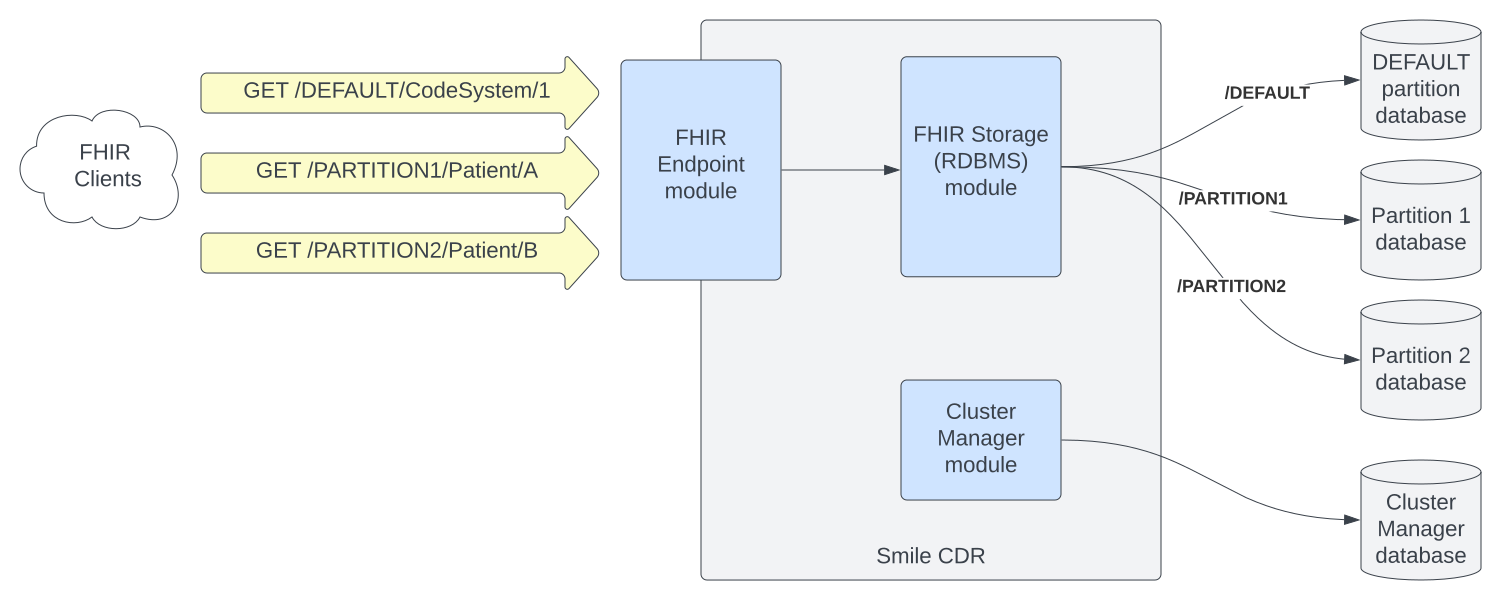
Partitions and Shards
In a MegaScale architecture, the dual concepts of Partitions and Shards are used. These two terms mean related but different things.
A Partition is a single grouping of resources. Any individual resource must be assigned to a single partition, and that partition will generally contain multiple resources.
One or more partitions are assigned to a given database schema. This grouping of Partitions to a single database schema is called a Shard.
The following diagram shows a potential mapping of the 15000 partitions defined in Patient ID Partition Mode to 3 shards. This is only one potential mapping however; it is possible to have fewer or more shards depending on anticipated storage and scaling requirements.
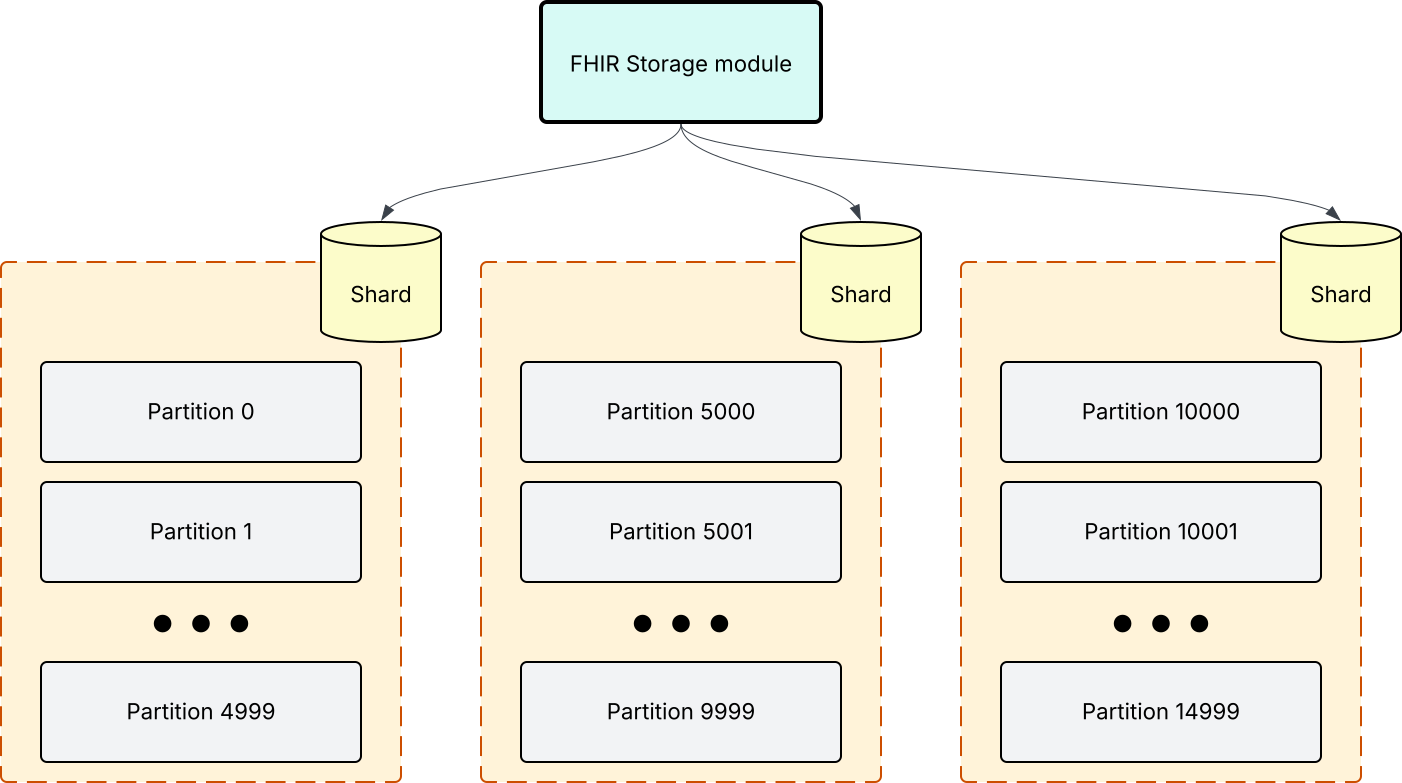
Patient ID Partition Selection Mode
See MegaScale Patient ID Partition Selection Modes for details on how to use these partition selection modes with MegaScale.
FHIR Transactions Spanning Multiple Shards
MegaScale creates an architecture where different partitions are stored on different shards (see Partitions and Shards above). This has several implications to the semantics and operation of FHIR Transaction processing, but does not mean that FHIR transactions can not be used even if they span multiple shards.
When loading data using a FHIR Transaction Bundle, the system will automatically attempt to respect the semantics of the FHIR transaction as much as possible, but will make compromises where necessary if a transaction needs to span multiple shards.
When a transaction Bundle needs to write to multiple shards, it will be automatically split into multiple discrete FHIR Transaction Bundles and executed in sequence. The server will order these bundles according to resource dependencies within the Bundle, and will use the outcome of earlier bundles to inform the processing of later Bundles.
For example, suppose you are have configured your Partition Selection Mode to Patient ID Partition Selection Mode, with your Ancillary Resources on a separate MegaScale database from our Patient Resources. In this example, you might have Patient and Encounter resource referencing Organization and Location resources in the same FHIR Transaction Bundle.
In this scenario, the server will automatically process the Ancillary resources first. Any newly assigned resource IDs will be used in references from the subsequent Patient and Encounter resources.
As a result, it is not possible to have circular dependencies in FHIR Transaction Bundles executed on a MegaScale server where the cycle crosses shard boundaries. For example, if your Patient and Ancillary data are on separate shards, attempting to process a FHIR Transaction Bundle with a reference from a Patient to an Organization where the Organization also holds a reference to the Patient would result in an error.
FHIR Searches Spanning Multiple Shards
FHIR searches may span multiple shards (see Partitions and Shards above). When a search is initiated and the chosen Partitioning Selection Mode indicates that multiple partitions should be searched, the system will begin a serial (one at a time) search across all selected partitions.
This is significantly less efficient than a search against a single partition or shard, and should be avoided wherever possible in favor of single-shard searches. The primary use case is for identification of individual resources (e.g. a conditional update on a resource by identifier where the partition is not known).
When searching multiple shards, the _sort parameter may not be used. Multi-shard searches attempting to use this parameter will result in an error.
LimitationsLMA
This section lists the known limitations on this feature.
FHIR Interactions
The following FHIR interactions have been tested:
- Create/Update
- Search (limitations)
- $reindex – It is possible to reindex a single partition by providing the tenant name in the URL (e.g.
/P1/$reindex), or all partitions using_ALLas the tenant name (e.g. POST/_ALL/$reindex). - $validate
- $expunge – Expunge everything is verified to work, and will only expunge everything for a single MegaScale database at a time.
- $delete-expunge – Delete expunge is verified to work, and will only delete and expunge for a single MegaScale database at a time.
- FHIR Transactions (limitations)
No other features, operations, or interactions have been tested or are expected to work with MegaScale.
You must ensure that all updates within a single Bundle target a single MegaScale database. This is true for REQUEST_TENANT partitioning mode, but may not be true for other partition modes like Patient-Id partitioning or custom partitioning solutions.
Cross-Partition Searching
Search requests will only include results from a single database.
ConfigurationLMA
To enable MegaScale mode, the following settings must be set.
On the FHIR Storage (RDBMS) module:
- Partitioning Enabled must be set to
true. - Configure Database connection details
- These will be the connection details for the
DEFAULTpartition.
- These will be the connection details for the
- At least one partition must be created. See Seeding Partitions.
- Partition Selection Mode must be set to one of:
REQUEST_TENANT,REQUEST_HEADER,BUCKETED_PATIENT_ID, orPATIENT_ID. - MegaScale Enabled must be set to
true. - A Connection Provider Interceptor must be set (see below).
On the FHIR Endpoint module:
- If using
REQUEST_TENANTpartition selection mode, Tenant Identification Strategy must be set toURL_BASED.
Cross-Partition Reference Concurrency
When a resource is written that contains a reference whose target lives on a different shard (i.e. a different database), the write must open a nested transaction against the target shard to resolve the reference. Under high concurrent ingestion, a burst of such cross-shard resolutions can exhaust a target shard's connection pool while every borrower is also holding a connection in its source shard — a classic hold-and-wait deadlock across pools.
(Cross-partition references that resolve within the same shard are not affected by this — they reuse the source connection and do not contend for a second pool.)
To prevent the cross-shard cycle, MegaScale caps the number of cross-shard reference resolutions that may be in flight at any one time:
- MegaScale Cross-Partition Reference Concurrency controls the cap. It defaults to
db.connectionpool.maxtotal - 4if unset. - MegaScale Cross-Partition Reference Acquire Timeout controls how long an ingest thread will wait for a permit before failing the write with an error.
Tuning Guidance
The default works for most deployments. Tune it deliberately if the defaults do not match your topology.
- Pick a value strictly below the smallest target shard's
db.connectionpool.maxtotal. Sizing the cap at or above pool capacity defeats its purpose — the cycle becomes possible again. Leave at least a few slots of headroom in each pool for the outer write that holds them. - Symmetric pools across shards keep tuning simple. If shards have different pool sizes, size the cap against the smallest pool you write into, not the average.
- Raise it cautiously when throughput is the bottleneck. A higher cap permits more concurrent cross-shard work but consumes more target-pool connections per second. Verify the target shards have spare pool capacity (
db_num_idlemetric) before raising it. - Lower it (down to 1, if needed) for diagnosis. If you suspect cross-shard contention is degrading throughput, drop the cap aggressively and watch the queue length and timeout count. Persistent saturation at low caps points to ingest concurrency that exceeds your provisioned cross-shard capacity.
- The acquire timeout should be generous in steady state. If a write waits longer than the timeout, it fails with HAPI-2701 and the upstream consumer (Kafka, Camel, etc.) is expected to redeliver. A short timeout will make transient bursts look like errors; a long one will mask real saturation. The 60-second default is intended to absorb normal bursts while still surfacing sustained overload.
Observing Saturation
Two runtime metrics expose the gate's state. They are emitted by every FHIR Storage module instance that has MegaScale enabled, both through the Codahale MetricRegistry (visible on the cluster manager's metrics endpoints) and through OpenTelemetry.
| Metric | OpenTelemetry name | Type | What it means |
|---|---|---|---|
megascale_crossreference_queue_length | smilecdr.storage.megascale.crossreference.queue_length | Gauge | Number of ingest threads currently waiting for a permit. Zero in healthy operation. Sustained non-zero readings mean cross-shard demand exceeds the configured cap. |
megascale_crossreference_timeout_count | smilecdr.storage.megascale.crossreference.timeout_count | Cumulative counter | Total cross-shard resolutions that have failed because they could not acquire a permit before the acquire timeout. The rate of change of this counter (e.g. rate(megascale_crossreference_timeout_count[5m])) is the actionable signal — a non-zero rate means writes are failing right now. |
Recommended alerts and dashboards:
- Alert on a non-zero rate of
megascale_crossreference_timeout_countover the last few minutes — writes are being rejected. - Alert on
megascale_crossreference_queue_lengthsustained above zero for several minutes — saturation is imminent even if no writes have failed yet. - Dashboard showing queue length alongside
db_num_activeanddb_num_idlefor each shard's pool, so you can correlate gate saturation with actual pool exhaustion.
Connection Provider InterceptorLMA
MegaScale connection details are supplied using a Java Smile CDR Interceptor using the STORAGE_MEGASCALE_PROVIDE_DB_INFO pointcut.
See Example: MegaScale Connection Provider to see how this pointcut can be used. This example is also available in the Interceptor Starter Project.