Patient ID Partition Modes
This page describes the Patient ID Partition Mode and Bucketed Patient ID Partition Mode. See Partitioning for more information about partitioning in general, and for a description of other partitioning modes.
Patient ID Partition Selection ModeLMA
In this Patient ID Partition mode, the partition ID is determined by the resource ID of the Patient resource associated with the request. A hash function is used to create a partition ID that will be consistently used for all resources belonging to a given patient.
Importantly, this does not mean that each Patient has a unique partition ID belonging only to that Patient. Instead, it means that for any given Patient and all of its associated data, the same partition ID will be used. Other Patients and their associated data might be on the same partition, and might be on other partitions.
This is helpful if you have a system that will be used to satisfy Patient-oriented queries and needs to scale to very large amounts of data, since it means that any query for an individual Patient and its associated data will only need to query one partition.
For example, suppose the id Patient/ABC results in a hash value of 111. This means that:
-
When creating data:
- When Patient/ABC is created, it will be automatically assigned the partition ID of 111.
- Any Observation, Encounter, etc. resources that have a subject of Patient/ABC will also be automatically assigned a partition ID of 111.
- When creating resources that are not in the FHIR Patient Compartment, they will be placed in the Default Partition.
- Resources like Observation or MeasureReport can have a
subjectof Patient, Group, or other targets. When they are related to Patients, they will be stored in the patient partition. When linked to non-patient resources, they will be stored in the Default Partition.
-
When retrieving data:
- A FHIR read for Patient/ABC will automatically be assigned the partition ID of 111.
- A FHIR search for Patient?_id=ABC will automatically be assigned the partition ID of 111.
- A FHIR search for Observation?subject=Patient/ABC will automatically be assigned the partition ID of 111.
- When retrieving resources that are not in the FHIR Patient Compartment, they will be retrieved from the Default Partition.
This mode imposes several important limitations. These technical limitations are caused by current constraints of the HAPI FHIR partitioning system and should be relaxed in a future release. Please get in touch if you have specific needs that are impacted by these limitations.
- The target compartment can NOT be changed after creation. E.g.
- The subject of an Encounter can NOT be changed from Patient/1 to Patient/2
- The subject of an Encounter can NOT be created null, and changed to Patient/1
- The subject of an Encounter can NOT be changed from Group/1 to Patient/1
- If configured with
dao_config.server_id_mode=SEQUENTIAL_NUMERIC, then all Patient resource IDs must be Client-assigned (e.g. using an HTTP PUT). This is not required if the system is configured withdao_config.server_id_mode=UUID. - Searches for resources in the Patient compartment will be slower if a search parameter is not included in the request that identifies the specific patient being searched. For example, the search
Observation?identifier=http://foo|123may be slower than the searchObservation?subject=Patient/ABC&identifier=http://foo|123.
MegaScale Restrictions
Patient Id Partitioning under MegaScale has additional restrictions in addition to the restrictions listed above:
- Search over multiple patients is not supported. E.g.
Observation?subject=Patient/A,Patient/B - Search without a qualifying subject is not supported. E.g.
Observation?identifier=http://foo|123 - Chained search on
patientandsubjectsearch parameters is supported only when combined with a direct patient reference on the same parameter (e.g.Observation?subject=Patient/abc&subject.gender=female). Chain-only queries without a direct reference (e.g.Observation?subject.gender=female) are not supported. Chaining on other compartment search parameters (e.g.Observation?performer.identifier=http://foo|bar) is also not supported.
Partition ID Generation/Hashing
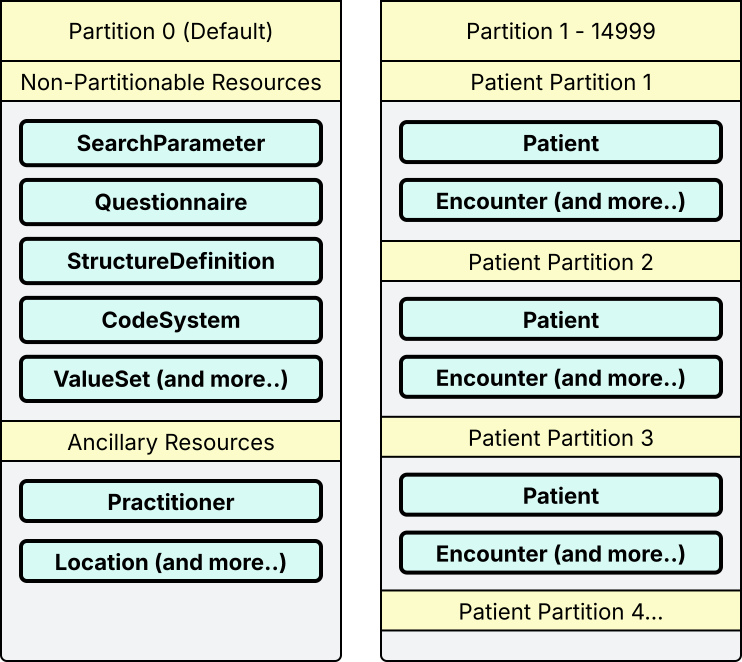
In Patient ID Partition Mode, non-partitionable resources (e.g. StructureDefinition) and ancillary resources (e.g. Location) are always placed on the default partition.
On non-MegaScale repositories, Patient compartment resources (e.g. Patient, Encounter) are distributed evenly across the range of 0-14999, using a stable hash of the Patient resource ID. On MegaScale repositories this scheme is modified slightly, see Partition Distribution for details.
Required Settings
To use Patient ID Partition Mode:
- Partition Naming Mode setting must be set to
UNNAMED. - Request Partition Security should generally be set to
false. - Server ID Mode should be set to
UUID. Or if set toSEQUENTIAL_NUMERIC, then Patient resource creation requires client-assigned id.
Because Partition IDs for standard partitions will always fall between 0 and 14999, it is recommended to use a Default Partition ID of 0.
Example
The following diagram shows an example of how Patient ID Mode partitions data. Note that the resource types shown are only examples, as there are other types of resources which must be placed in the default partition, and in the patient compartment partitions.
Bucketed Patient ID Partition Selection ModeLMA
Please read the Patient ID Partition Mode first if you have not already, as this mode builds on top of the semantics of Patient ID Partition Mode.
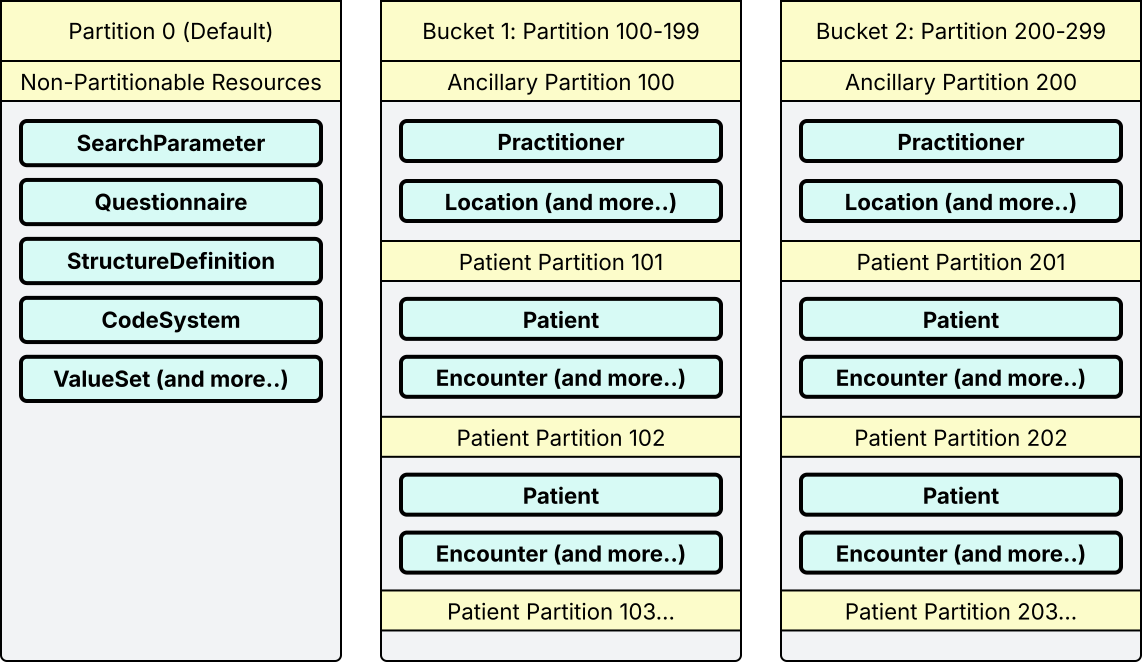
This mode creates multiple "buckets" of partition IDs, each containing a range of partition IDs. When a read or a write operation is being performed, the system will determine the bucket based on a custom HTTP request header named X-Request-Partition-IDs. Within the Bucket, the specific partition ID is chosen based on the resource ID of the Patient resource associated with the request.
This mode builds on Patient ID Partition Mode for systems that hold data from multiple sources (e.g. different clinical systems), as is often the case for Community Information Exchange (CIE) systems. Each source can be assigned its own bucket, so its data occupies a dedicated range of partition IDs instead of sharing a single range across all sources. Bucketing is a scalability feature and does not provide access isolation between sources.
The Request Header
When making requests to the FHIR repository in Bucketed Patient ID Partition Mode, the X-Request-Partition-IDs header is used to specify the range of partition IDs to be used.
To specify a specific bucket, the header must have a value beginning with _ followed by a number which is a multiple of 100. For example, the following example specifies that the request should target the bucket with a range of partition IDs from 400 to 499:
X-Request-Partition-IDs: _400
It is not currently possible to specify multiple buckets in a single request.
Example
The following diagram shows an example of how Patient ID Mode partitions data. Note that the resource types shown are only examples, as there are other types of resources which must be placed in the default partition, and in the patient compartment partitions.
Configuring Pre-Assigned Patient Identifier Systems
Identifier systems that will be used for conditional operations on Patient resources must be declared in the FHIR Storage module configuration, using the Patient Identifier Systems for Pre-Assignment setting. Any identifier systems that have not been pre-declared in configuration will not be available for use in conditional operations, and trying to use them will result in an error.
This setting accepts multiple identifier systems, each separated by whitespace (space or newline). Values can be a fixed value, e.g. http://example.org/practitioner. Values can also be specified as a regular expression by adding a prefix of ^ and a suffix of $, e.g. ^http://example.org/practitioner/[0-9]+$.
Values should not be added to this list if they have already been used in stored data in the repository. Values may be added to the list at any time, however, as long as this is done before adding any data using the new identifier system.
Implications of Pre-Assignment Patient Identifier Systems
Pre-assignment creates a permanent 1:1 mapping between the identifier and the resource ID assigned to this identifier. This has several important consequences:
- Any resource with an identifier that has a Pre-Assigned Patient Identifier System can never have that identifier removed or changed. Other identifiers may be added and removed as long as they do not also have a Pre-Assigned Patient Identifier System. Any attempt to remove or change the identifier with the Pre-Assigned Patient Identifier System will result in an error.
- No resource may have multiple identifiers with system values which are matched by the Pre-Assigned Patient Identifier Systems list.
- All identifiers with system values which are matched by the Pre-Assigned Patient Identifier Systems list have uniqueness enforced automatically, meaning that no two resources may have the same identifier with the same Pre-Assigned Patient Identifier System and value.
Resource Type Policies
When using Patient ID Partition Modes, the system will select which partition to use when creating and accessing resources based on the resource type based on the policy associated with that resource type. Each resource type has a default policy, but these defaults can be overridden.
| Policy | Behavior when creating a new resource | Behavior when searching for resources of this type |
|---|---|---|
| ALWAYS_USE_DEFAULT_PARTITION |
With this policy, resources will always be stored in the default partition. There are no
restrictions on creating or searching for resources with this policy.
Note that in Bucketed Patient ID Partition Selection mode, the offset ID (a multiple of 100) for the selected bucket will be used. This means that any resource types with this policy will still have a separate partition per bucket. |
Searches for resources of this type will always search the default partition. |
| ALWAYS_USE_PARTITION_ID/nnn |
With this policy, resources will always be stored in the partition identified by nnn. For example, the policy ALWAYS_USE_PARTITION_ID/999 will store resources in partition 999. There are no
restrictions on creating or searching for resources with this policy.
Note that in Bucketed Patient ID Partition Selection mode, the ID will be added to the offset ID (a multiple of 100) for the selected bucket. This means that any resource types with this policy will still have a separate partition per bucket. |
Searches for resources of this type will always search the default partition. |
| MANDATORY_SINGLE_COMPARTMENT | The resource must be a member of a single Patient compartment and will be stored in the appropriate patient-specific compartment. If the resource is not a member of a compartment, or if the resource is a member of multiple Patient compartments, an error will be raised unless the resource specifies a Patient Compartment Extension. | Searches for resources of this type must have a search parameter identifying the Patient compartment. |
| OPTIONAL_SINGLE_COMPARTMENT | The resource may be a member of a single Patient compartment, and will be stored in the appropriate patient-specific compartment if so. If the resource is not a member of a compartment, it will be stored in the default partition. If the resource is a member of multiple Patient compartments, an error will be raised unless the resource specifies a Patient Compartment Extension. |
Searches for resources of this type should have a search parameter identifying the Patient compartment for optimal performance. If such a search parameter is not present, all partitions will be searched which may have performance implications.
MegaScale: On MegaScale, if such a search parameter is not present, only the default partition will be searched. |
| NON_UNIQUE_COMPARTMENT_IN_DEFAULT | The resource may be a member of a single Patient compartment, and will be stored in the appropriate patient-specific compartment if so. If the resource is not a member of a compartment, or if it is a member of multiple compartments, it will be stored in the default partition unless the resource specifies a Patient Compartment Extension. |
Searches for resources of this type should have a search parameter identifying the Patient compartment for optimal performance. If such a search parameter is not present, all partitions will be searched which may have performance implications.
MegaScale: Not supported on MegaScale. Requires cross-partition search (both the patient partition and the default partition), which MegaScale does not support. |
Default Policies
The following table shows the default policies for different resource types.
| Resource Type(s) | Default Policy |
|---|---|
| Patient compartment resources (except as noted below) | MANDATORY_SINGLE_COMPARTMENT |
| Provenance (Provenance is a Patient compartment resource, but its Patient references are not required — it may reference zero, one, or multiple Patients.) |
NON_UNIQUE_COMPARTMENT_IN_DEFAULT
MegaScale: OPTIONAL_SINGLE_COMPARTMENT (because NON_UNIQUE_COMPARTMENT_IN_DEFAULT is not supported on MegaScale). If a Provenance references multiple Patients, the Patient Compartment Extension can be used to specify which compartment it belongs to. |
| List and Group (these resources are in the Patient compartment, but are treated specially as they are generally intended to be used in context involving multiple patients) | ALWAYS_USE_DEFAULT_PARTITION |
| Ancillary resources | ALWAYS_USE_DEFAULT_PARTITION |
Replacing Default Policies
The Patient ID Mode Resource Type Policies setting can be used to override the default policies for resource types.
The format of this setting is a list of <resource type>=<policy> pairs, with each entry on a new line. Lines beginning with # are ignored. For example:
DocumentReference=ALWAYS_USE_DEFAULT_PARTITION
Group=ALWAYS_USE_PARTITION_ID/1
Patient Compartment Extension
The patient-compartment extension allows explicitly specifying which Patient compartment a resource belongs to. The partition is then determined based on that compartment assignment:
http://hapifhir.io/fhir/StructureDefinition/patient-compartment
The extension accepts two kinds of values:
Patient/<id>— assigns the resource to the specified Patient's compartment. The referenced Patient must be one of the resource's compartment members; otherwise an error is raised.NONE— marks the resource as not belonging to any Patient compartment, effectively causing it to be stored in the non-compartmental (default) partition.
This is useful when:
- A resource belongs to multiple Patient compartments and you need to specify which Patient compartment it should be assigned to for storage purposes.
- A compartmental resource should not be assigned to any specific Patient's partition, despite having Patient references (e.g. a Provenance created when merging two Organizations).
Applicability by Policy
The extension is only applicable to patient-compartment resource types (not Patient itself, and not non-compartmental types like Organization). It is rejected with an error if set on those resource types.
For compartment resource types, the behavior depends on the active policy and the extension value:
| Policy | Extension Value | |
|---|---|---|
Patient/<id> |
NONE |
|
| MANDATORY_SINGLE_COMPARTMENT | Assigns to specified Patient's compartment | Rejected — this policy requires a Patient compartment |
| OPTIONAL_SINGLE_COMPARTMENT | Assigns to specified Patient's compartment | Treated as non-compartmental; stored in the default partition. Use this value only when you are sure the resource will not need to be searched via Patient reference. Patient-ref searches only look in that patient's partition and will not find resources in the default partition (e.g. Provenance?target=Patient/X would not find this resource). |
| NON_UNIQUE_COMPARTMENT_IN_DEFAULT | Assigns to specified Patient's compartment | Treated as non-compartmental; stored in the default partition |
| ALWAYS_USE_DEFAULT_PARTITION | Extension is ignored (policy always determines the partition) | |
| ALWAYS_USE_PARTITION_ID/nnn | Extension is ignored (policy always determines the partition) | |
Examples
Assigning to a specific Patient's compartment:
{
  "resourceType": "Provenance",
  "extension": [
    {
      "url": "http://hapifhir.io/fhir/StructureDefinition/patient-compartment",
      "valueString": "Patient/123"
    }
  ],
  "target": [
    { "reference": "Patient/123" },
    { "reference": "Patient/456" }
  ]
}
Treating as non-compartmental:
{
  "resourceType": "Provenance",
  "extension": [
    {
      "url": "http://hapifhir.io/fhir/StructureDefinition/patient-compartment",
      "valueString": "NONE"
    }
  ],
  "target": [
    { "reference": "Organization/A" },
    { "reference": "Organization/B" },
    { "reference": "Patient/789" }
  ]
}