Message Broker: Kafka
See the Message Broker page for a description of how message queues work by default in Smile CDR.
The Apache Kafka broker is the recommended broker option, particularly for large scale deployments of Smile CDR.
Set module.clustermgr.config.messagebroker.type to KAFKA in the Cluster Manager to have Smile CDR use Kafka instead of a JMS message broker for subscription processing.
Smile CDR uses the following configuration properties for Kafka configuration:
module.clustermgr.config.messagebroker.type=KAFKA
module.clustermgr.config.kafka.bootstrap_address=localhost:9092
module.clustermgr.config.kafka.group_id=smilecdr
module.clustermgr.config.kafka.auto_commit=false
module.clustermgr.config.kafka.validate_topics_exist_before_use=false
module.clustermgr.config.kafka.ack_mode=MANUAL
module.clustermgr.config.kafka.producer.auto_flush=true
module.clustermgr.config.kafka.credential_type=MANUAL
The values above for the module.clustermgr.config.kafka.* properties are the defaults, so you don't need to include these properties in your config if you are using the default value.
bootstrap_address is a comma-separated list of host and port pairs that are the addresses of the Kafka brokers in a "bootstrap" Kafka cluster that a Kafka client connects to initially to bootstrap itself.
group_id is the name of the kafka consumer group id used by all Smile CDR Kafka subscription consumers. It's fine to leave this as the default.
auto_commit If this property is set to true, Kafka auto-commits the offsets according to its configuration. If it is false, the Kafka Consumer Ack Mode is used to determine commit behavior. See Committing Offsets
validate_topics_exist_before_use. Set this to true if your Kafka broker is configured to prevent new topics from being automatically created (e.g. if 'auto.create.topics.enable' is set to false on the broker). When this property is set to true, Smile will prevent subscriptions from being created or updated if the delivery topic they depend on doesn't exist yet.
auto_flush controls whether the Kafka producer flushes after every send. The default true (introduced in Release 2025.05) narrows the message-loss window before broker acknowledgement; in practice it prevents producer-side batching for sequential sends and neutralizes Kafka's linger.ms and batch.size properties. When set to false, these Kafka properties will be used and records may be batched. In exchange, records may sit longer in the producer's in-memory accumulator, increasing the window for loss if the JVM crashes before acknowledgement.
ack_mode specifies the Kafka consumer listener container offset commit behavior. This value is only used if Kafka Auto Commit is false. By default, cdr kafka consumers manually acknowledge every successful message processing back to the Kafka broker. This ensures that no message is ever processed twice. However it adds processing overhead. If downstream consumers can process the same message twice, then it is recommended to set kafka.auto_commit to true (in which case the kafka.ack_mode property will be ignored). See Committing Offsets for a list of options.
credential_type specifies what credentials (if any) Kafka should authenticate with. See Kafka Credentials below for details.
Like the JMS Message Broker, Kafka uses the Cluster Manager module consumers_per_matching_queue and consumers_per_delivery_queue properties to determine the number of consumers for each topic. Note that for kafka, the number of consumers should be less than or equal to the number of partitions per topic set on the broker num.partitions configuration property. See Spring Kafka Multi-Threaded Message Consumption.
Kafka Topic Names
For Kafka brokers, the Smile CDR channels are synonymous with Kafka topics. See Channel Names for details on how these topics will be named.
Note that prior to Release 2023.02.R01 all - (hyphen) characters were replaced with a . (period) in Smile CDR generated channel names. So for example, the Subscription matching topic in a default configuration was named subscription.matching.Master.persistence.
In Release 2023.02.R01 and onwards, this functionality can be disabled using the Kafka Replace Hyphens with Periods property.
Message Ordering with Partition Keys
Kafka guarantees message ordering within a partition. To ensure related messages are processed in order, assign the same partition key to messages that must be processed sequentially.
When a message is published with a partition key, Kafka hashes the key to determine which partition receives the message. All messages with the same key hash to the same partition, ensuring they are consumed in order.
Partition Key Selection
Choose a partition key based on the ordering requirements of your data:
- Patient-centric data: Use the patient identifier (e.g., MRN, enterprise ID) as the partition key
- Non-patient-centric data: Use the resource ID or another stable identifier. For low-volume non-patient data, a shared constant key routes all such messages to a single partition.
Trade-offs: Ordering vs. Parallelism
Partition keys affect parallelism:
- More unique keys = messages distributed across more partitions = higher parallelism
- Fewer unique keys = messages concentrated in fewer partitions = stronger ordering guarantees but less parallelism
For example, using patient ID as the partition key allows parallel processing across different patients while ensuring all messages for the same patient are processed in order.
Consumer Configuration
The number of consumers should be less than or equal to the number of partitions. See the consumers_per_matching_queue and consumers_per_delivery_queue properties in Message Broker configuration.
For guidance on setting partition keys in Camel routes, see Message Keys for Ordering.
Kafka - Overriding Default Configuration Settings
If you need to override any Kafka default configuration settings, for either the Producer or Consumer, you can configure your own properties files using the Web Administration Console in the Cluster Manager "Kafka" Section. The following sections are available for override:
If the above properties are set, the indicated files must exist in the location defined. You can also store those files in the classpath, by prefixing the filename with classpath: and then the relative location, e.g. classpath:/cdr-kafka-producer-config.properties.
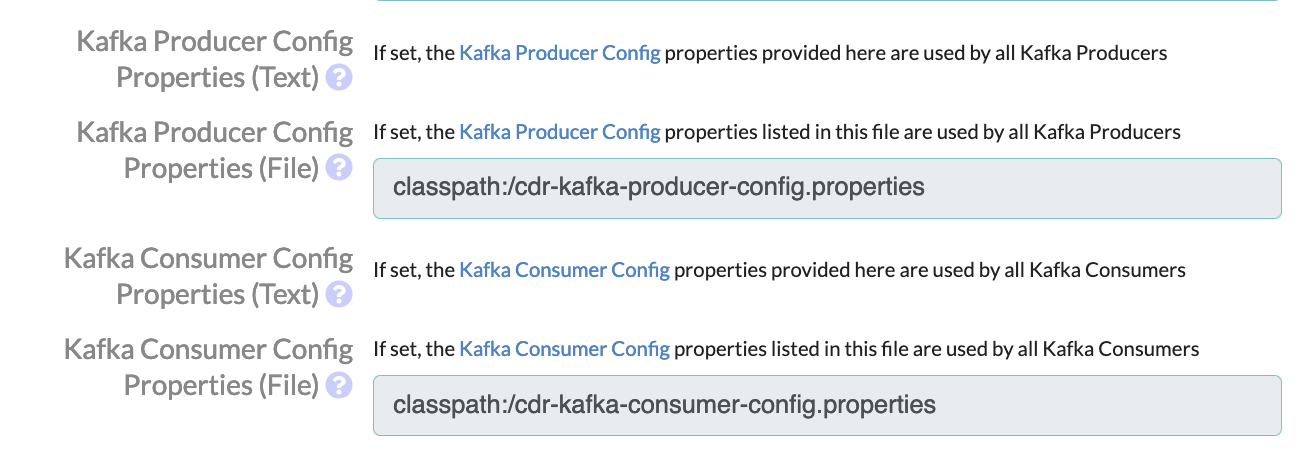
NOTE: This example is using an actual file on the filesystem to override default configuration values, but you can also use a text value in the base Smile CDR configuration file, if you do not wish to use this approach.
One example of where this approach can be very useful, is when you are loading data into Smile CDR and it is causing a lot of Kafka messages to be produced, and that causes Producer or Consumer heartbeat timeouts to occur which then causes Kafka to rebalance. When Kafka rebalances, all message processing will stop for a few minutes, and it also could cause exceptions and errors to be logged in the Smile CDR Server log in a cascading failure. You should always try to avoid a Kafka rebalancing scenario. To help avoid this scenario, you can override some default configuration values in your custom properties file. We have found the following settings generally good for avoiding rebalancing issues, but they may need to be modified for specific use cases:
# 2 minutes
heartbeat.interval.ms=120000

# 5 minutes
session.timeout.ms=300000

# 60 minutes
max.poll.interval.ms=3600000

# Only grab 200 records at a time so we can process them before a timeout occurs
max.poll.records=200
Only configuration settings that you wish to override need to be included. The rest of the settings will use the default values.
Configuring Kafka with SASL
The following example configures Smile CDR to authenticate to a Kafka broker with a SASL username and password. Use this approach with the default MANUAL credential type.
module.clustermgr.config.kafka.sasl.mechanism=PLAIN
module.clustermgr.config.kafka.security.protocol=SASL_SSL
module.clustermgr.config.kafka.sasl.jaas.config=org.apache.kafka.common.security.plain.PlainLoginModule required \
	username="admin_username" \
	password="admin_password";
SASL_SSL encrypts the connection, including the credentials. If your broker only offers an unencrypted SASL listener, set kafka.security.protocol to SASL_PLAINTEXT instead. Credentials are then sent in clear text, so only do this on a trusted network.
Kafka Credentials
The kafka.credential_type setting controls where Smile CDR gets the credentials it uses to authenticate to Kafka. It accepts the following values:
MANUAL(the default): Smile CDR authenticates with the security settings you configure yourself, such askafka.security.protocol,kafka.sasl.*andkafka.ssl.*, and any settings in the producer and consumer properties. If none are configured, Smile CDR connects without authenticating. Use this for self-managed Kafka clusters.AZURE_DEFAULT: Smile CDR gets a token for Azure Event Hubs from Azure's DefaultAzureCredential, which tries a chain of identity sources and uses the first one that succeeds.AZURE_WORKLOAD_IDENTITY: Smile CDR gets a token for Azure Event Hubs from the AKS workload identity of its pod, and from no other source. If the pod has no workload identity, Smile CDR can't authenticate and the Kafka connection fails.
Configuring Kafka for Azure Event Hubs
Azure Event Hubs provides a Kafka-compatible endpoint.
When Smile CDR runs in Azure, for example in an AKS (Azure Kubernetes Service) pod, it can authenticate to Event Hubs with its Azure identity (Microsoft Entra ID) instead of a connection string or other stored secret.
To do this, set kafka.credential_type to AZURE_DEFAULT or AZURE_WORKLOAD_IDENTITY.
The identity Smile CDR uses must be allowed to send and receive events on the Event Hubs namespace.
Unless topics (event hubs) are created ahead of time (and kafka.validate_topics_exist_before_use is set to true),
the identity will also need to be allowed to create them - see Authorize access to Event Hubs resources using Microsoft Entra ID.
module.clustermgr.config.messagebroker.type=KAFKA
module.clustermgr.config.kafka.bootstrap_address=mynamespace.servicebus.windows.net:9093
module.clustermgr.config.kafka.security.protocol=SASL_SSL
module.clustermgr.config.kafka.credential_type=AZURE_WORKLOAD_IDENTITY
With an Azure credential type, the following rules apply:
kafka.bootstrap_addressmust be the Event Hubs namespace host and port, for examplemynamespace.servicebus.windows.net:9093. Smile CDR requests its token for that namespace, so the address must name a single host.kafka.security.protocolmust beSASL_SSL. Event Hubs only accepts TLS-encrypted connections. See Event Hubs security and authentication.kafka.sasl.mechanismandkafka.sasl.jaas.configmust not be set. Smile CDR sets the SASL mechanism (OAUTHBEARER) and the login configuration itself.- The producer and consumer properties can't override
sasl.mechanism,sasl.jaas.configorsasl.login.callback.handler.class, and doing so is a configuration error. Asecurity.protocolset there is ignored, with a warning; usekafka.security.protocolinstead. - The
kafka.ssl.*settings are not used. Event Hubs certificates are issued by public certificate authorities, so no truststore is needed.
Smile CDR's configuration diagnostics report any of these problems, and the Kafka clients fail to start until they are fixed.
Choosing the Azure Client ID
By default, the Azure identity libraries choose the client ID from the environment, such as the AZURE_CLIENT_ID variable that the AKS workload identity webhook sets.
To use a different identity, set kafka.azure.client_id to that identity's client ID. This value takes precedence over the environment. With AZURE_DEFAULT, it applies to both workload identity and managed identity.
module.clustermgr.config.kafka.azure.client_id=11111111-2222-3333-4444-555555555555