HTTP Server Setup
This page provides information on setting up an HTTP server module, such as a FHIR REST endpoint, or the Web Admin Console.
Respecting Forward Headers
If the server is behind a reverse proxy, load balancer, or other network infrastructure, this may obscure the originating network details of clients making requests. For example, if all requests are routed through a load balancer, by default all requests will appear to come from that load balancer. This means that audit/transaction logs may show incorrect information, and cause other similar issues.
In order to avoid this issue, you can configure your load balancer to provide a Forwarded header to Smile CDR containing details about the original client's location and connection. In order for Smile CDR to respect this header, you will need to enable the Respect Forward Headers setting.
You can learn more about the Forwarded header (and its legacy equivalents, which are also supported) on the MDN Forwarded page.
The following headers are supported:
ForwardedX-Forwarded-HostX-Forwarded-ServerX-Forwarded-ForX-Forwarded-ProtoX-Proxied-HttpsProxy-auth-certProxy-ssl-id
Reverse Proxying with NGINX
A typical configuration for setting up a reverse proxy using NGINX is shown below. In this example, port 443 (the default https port) is being forwarded to a Smile CDR instance listening on port 8000 (the typical FHIR listener port).
server {
    listen 443 ssl default_server;
    location / {
        proxy_set_header    Host                        $host;
        proxy_set_header    X-Real-IP                   $remote_addr;
        proxy_set_header    X-Forwarded-For             $proxy_add_x_forwarded_for;
        proxy_set_header    X-Forwarded-Host   $host:443;
        proxy_set_header    X-Forwarded-Server $host;
        proxy_set_header    X-Forwarded-Port   443;
        proxy_set_header    X-Forwarded-Proto  https;
        proxy_pass          http://localhost:8000/;
    }
}
Specifying a Custom Context Path
In some cases, it is desirable to have an HTTP server module not serve its contents from the root URL on the server.
For example, suppose a Smile CDR instance is set up with two modules, each providing an HTTP server. The first is a JSON Admin Endpoint listening on port 9000 and the second is the Web Web Console listening on port 9100.
A reverse proxy such as NGINX can be configured to listen on a single port and then to serve both Smile CDR modules through this same proxy on the same port.
An example of this configuration is shown in the following diagram.
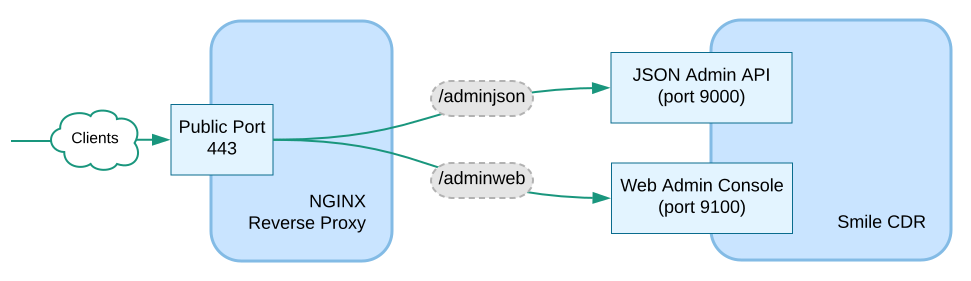
In order to support this configuration, the reverse proxy could be configured to route requests to path /adminjson on port 443 to port 9000 and to route requests to path /adminweb on port 443 to port 9100.
In order for this setup to work correctly however, the two modules need to be configured to understand that a request to (for example) /adminweb/index.html is actually only a request for /index.html, and that any absolute links served to the client need to include the initial part of the path.
This is accomplished by setting the context_path configuration property.
Reverse Proxying with NGINX
A typical configuration for setting up a reverse proxy using NGINX is shown below. In this example, port 443 (the default https port) is being forwarded to a Smile CDR instance listening on ports 9000 and 9100 (the typical JSON Admin API, and Web Admin Console ports respectively).
server {
    listen 443 ssl default_server;
    location /adminjson {
        proxy_set_header    Host                        $host;
        proxy_set_header    X-Real-IP                   $remote_addr;
        proxy_set_header    X-Forwarded-For             $proxy_add_x_forwarded_for;
        proxy_set_header    X-Forwarded-Host   $host:443;
        proxy_set_header    X-Forwarded-Server $host;
        proxy_set_header    X-Forwarded-Port   443;
        proxy_set_header    X-Forwarded-Proto  https;
        proxy_pass          http://localhost:9000/admin;
    }
    location /adminweb {
        proxy_set_header    Host                        $host;
        proxy_set_header    X-Real-IP                   $remote_addr;
        proxy_set_header    X-Forwarded-For             $proxy_add_x_forwarded_for;
        proxy_set_header    X-Forwarded-Host   $host:443;
        proxy_set_header    X-Forwarded-Server $host;
        proxy_set_header    X-Forwarded-Port   443;
        proxy_set_header    X-Forwarded-Proto  https;
        proxy_pass          http://localhost:9100/fhir;
    }
}
Access Logs
HTTP servers provided by Smile CDR may be configured to create one or more access logs. These logs can log every HTTP request that is processed by the system at a low level.
Access logs are named appenders that are processed through the standard Logback logging facility. See System Logging for information on how to configure Logback.
To create logs, an access log definition should be placed in the access_log.appenders property.
The value for this property represents the complete collection of appenders, where each line is a new appender. Each line in the property value should take the format:
[appender.name]=[access log line format]
For example, a simple access log for module fhir_endpoint could be created by using the following configuration:
module.fhir_endpoint.config.access_log.appenders = customer.fhir_endpoint.access=Request: $(request_time_iso8601) $(method) $(request_uri_original) $(request_protocol)
As you can see, the property value has a number of variable substitutions taking the form $(name). A list of available substitutions appears below.
Also note that the appender name (e.g. customer.fhir_endpoint.access) can be any identifier you want. In order to avoid conflicts with internal Smile CDR log appenders, it is recommended to prefix the appender name with customer. as shown.
HTTP Troubleshooting Logs
Note that as an alternative to defining individual access logs, the HTTP Troubleshooting Log can also be used. This log can be dynamically added to a running server without needing to restart the module, which can be a benefit in some troubleshooting circumstances.
Redirecting Access Logs to a Dedicated File
By default, this appender will output to the same smile.log log file where all other logging appears. This may be redirected to a dedicated access log file by placing an appender definition and a logger definition in the Smile CDR logback.xml file (found in the classes/ directory inside your Smile CDR installation). An example is shown below:
<appender name="FHIR_ENDPOINT_ACCESS" class="ch.qos.logback.core.rolling.RollingFileAppender">
    <file>${smile.basedir}/log/fhir_endpoint_access.log</file>
    <rollingPolicy class="ch.qos.logback.core.rolling.TimeBasedRollingPolicy">
        <fileNamePattern>${smile.basedir}/log/fhir_endpoint_access.%d{yyyy-MM-dd}.log.gz</fileNamePattern>
        <maxHistory>30</maxHistory>
    </rollingPolicy>
    <encoder>
        <pattern>%msg%n</pattern>
    </encoder>
</appender>
<logger name="customer.fhir_endpoint.access" additivity="false">
    <appender-ref ref="FHIR_ENDPOINT_ACCESS"/>
</logger>
Available Substitutions
| Name | Description |
|---|---|
| $(n) | A newline character. |
| $(module_id) | The ID of the Smile CDR module this HTTP server is running on. |
| $(node_id) | The ID of the Smile CDR node this HTTP server is running on. |
| $(request_time_strftime) |
The request date/time in strftime format (e.g. 10/Oct/2000:13:55:36 -0700).
|
| $(request_time_iso8601) | The request date/time in ISO 8601 format (e.g. 2018-07-18T21:08:32+00:00). |
| $(remote_ip) | The IP of the requesting client. |
| $(method) | The HTTP verb. |
| $(request_uri_original) | The requested URI (e.g. /Patient/123). |
| $(request_protocol) | The requested protocol (e.g. HTTP/1.0). |
| $(response_status_code) | The response status code (e.g. 200). |
| $(response_bytes_written) | The number of bytes written to the response. |
| $(request_header_cache_control) | The value of the request Cache-Control header. |
| $(request_headers_all) | The complete set of headers received in the request. Note that these headers are newline-separated, and this variable substitution will therefore likely write multiple lines to your log file. |
| $(request_headers_fhir) | All request headers starting with "fhir-". Note that these headers are newline-separated, and this variable substitution will therefore likely write multiple lines to your log file. |
| $(response_headers_all) | The complete set of headers returned by Smile CDR in the response. Note that these headers are newline-separated, and this variable substitution will therefore likely write multiple lines to your log file. |
| $(response_latency_millis) | |
| $(thread_name) | The name of the servicing thread (useful to diagnose multithreaded REST issues). |
Example Patterns
NCSA Common Log Format
The following pattern generates an access log using the NCSA Common Log Format.
customer.fhir_endpoint.access=$(remote_ip) - - [$(request_time_strftime)] "$(method) $(request_uri_original) $(request_protocol)" $(response_status_code) $(response_bytes_written)
This pattern produces an output similar to the following:
127.0.0.1 - - [18/Jul/2018:17:25:29 -0400] "GET /Patient HTTP/1.1" 200 9959
Enhanced Access Log Format
customer.fhir_endpoint.access=$(request_time_iso8601) [$(remote_ip) $(thread_name)] $(method) $(request_uri_original) $(request_protocol) -- $(response_status_code) $(response_bytes_written) $(response_latency)
Log Request Headers
The following pattern logs all requests, including the request headers (this will be verbose, but can be useful for troubleshooting).
customer.fhir_endpoint.access=$(request_time_iso8601) $(method) $(request_uri_original)$(n)$(request_headers_all)$(n)
This pattern produces an output similar to the following:
2011-01-01T23:59:59.123-04:00 GET /Patient/123
Host: example.com:8000
Accept-Encoding: gzip,deflate
Accept: application/fhir+json
Frame Options
By default, Smile CDR HTTP servers send X-Frame-Options: DENY to prevent web content from being embedded in HTML IFrame elements, protecting against Clickjacking attacks.
Configuring Frame Options
Two properties control framing behaviour:
frame_options.allow_from
Controls the X-Frame-Options header. Accepts the following values:
- (Blank) — (default) Sends
X-Frame-Options: DENY. Content cannot be embedded in any IFrame. - (URL) — Sends
X-Frame-Options: ALLOW-FROM <url>. ⚠ Deprecated: TheALLOW-FROMdirective is ignored by all modern browsers (Chrome, Safari, Edge). When this is set to a URL, CDR automatically emits an equivalentContent-Security-Policy: frame-ancestorsheader for modern browser support, and logs a warning at startup encouraging migration toframe_options.csp_frame_ancestors. The value should be an origin (e.g.https://portal.example.com) with no path component, as paths are not valid in the CSPframe-ancestorsdirective. SAMEORIGIN— SendsX-Frame-Options: SAMEORIGIN. Content may be embedded in IFrames on the same origin.*— TheX-Frame-Optionsheader is omitted. Content may be embedded from any origin.
frame_options.csp_frame_ancestors (recommended for new deployments)
Sets the Content-Security-Policy: frame-ancestors directive. This is the modern replacement for X-Frame-Options: ALLOW-FROM and is supported by all current browsers. It accepts a space-separated list of origins with full CSP syntax:
'self'— Same origin only.https://portal.example.com— Single explicit origin.'self' https://portal.example.com— Multiple origins.https://*.example.com— Wildcard subdomain.
When frame_options.csp_frame_ancestors is set, it takes precedence over any CSP value auto-derived from frame_options.allow_from.
Migration Guide
If you currently use frame_options.allow_from with a URL, set frame_options.csp_frame_ancestors to the equivalent origin while keeping frame_options.allow_from in place during the transition period:
| Old configuration | Transitional configuration |
|---|---|
frame_options.allow_from = https://portal.example.com | frame_options.allow_from = https://portal.example.comframe_options.csp_frame_ancestors = https://portal.example.com |
While both properties are set, CDR continues to emit the X-Frame-Options: ALLOW-FROM header for any remaining legacy clients, while also emitting the CSP header for modern browsers. Note that CDR logs a warning at startup whenever frame_options.allow_from is set to a URL.
Once no legacy clients remain, remove frame_options.allow_from. With it removed, CDR reverts to sending X-Frame-Options: DENY, so browsers that do not support the frame-ancestors directive will no longer be able to embed the content.